Integrate with AI Detection and Response
AI Detection and Response (ADR) detects incidents earlier and helps your team diagnose and respond faster by enriching every incident with AI Triage context. ADR relies on the same integration framework as Event Intelligence, so configuring an integration once makes its data available to both products.
ADR integrations fall into four categories, each tied to a stage in the Detect → Diagnose → Respond lifecycle:
Monitoring integrations - Bring event data from across your system into BigPanda where it is deduplicated, normalized, correlated, and enriched into context-rich actionable incidents. These integrations power both Event Intelligence correlation and ADR's AI-driven detection signals.
Changes and topology integrations - Leverage data in your change management and CMDB systems to enrich alerts, map system elements to active incidents, and feed Root Cause Changes so ADR can link incidents to the deployments that likely caused them.
Collaboration integrations - Connect with external tools such as ITSM, paging, and messaging software that help your team triage, troubleshoot, and remediate issues faster. Tickets and notifications carry ADR's enriched context so escalations start with a full picture.
Knowledge and service desk integrations (via Unified Data Connector)- Sync historical ITSM records, CMDB details, runbooks, and external observability data into the IT Knowledge Graph. ADR uses this data to power Historical and Similar Incidents, service desk observability, and external observability.
Shared data
Monitoring, change, and topology integrations configured for ADR are the same ones configured for Event Management. You do not need to configure them twice. When you enable ADR, these connections automatically begin powering AI Triage features alongside Event Intelligence correlation.
Handoff to Biggy and AI Incident Prevention is automatic for any incident that meets your configured thresholds. No additional integration work is required for the handoff itself - the AI products use the same enriched data ADR produces.
ADR integration building blocks
Three shared components underpin most ADR integrations. Review these before configuring individual integrations:
Open Integration Manager - A configurable pipeline for mapping incoming payloads to BigPanda alerts without writing custom code. Use it for any tile-based integration that supports tag mapping.
Alerts API - The direct REST endpoint for tools that can send custom HTTP payloads. Use it when no standard tile exists or when you need full control over the payload shape.
Unified Data Connector - The pipeline for syncing historical and reference data (ITSM, knowledge, external signals) into the IT Knowledge Graph. See BigPanda Unified Data Connector for setup details.
Administrators can install any of the standard integrations in BigPanda.
Navigate to the Integrations tab.
In the left pane, click New Integration.
Select or search for the desired integration.
Follow the instructions to install and configure your integration. Some configuration in the desired tool may be necessary.
Find an Integration
You can filter the list of available integrations by type by selecting the desired type at the top or by entering a search term in the top right. If you don't see the tool you use, consider using the Alerts API, email parser, or contact BigPanda support.
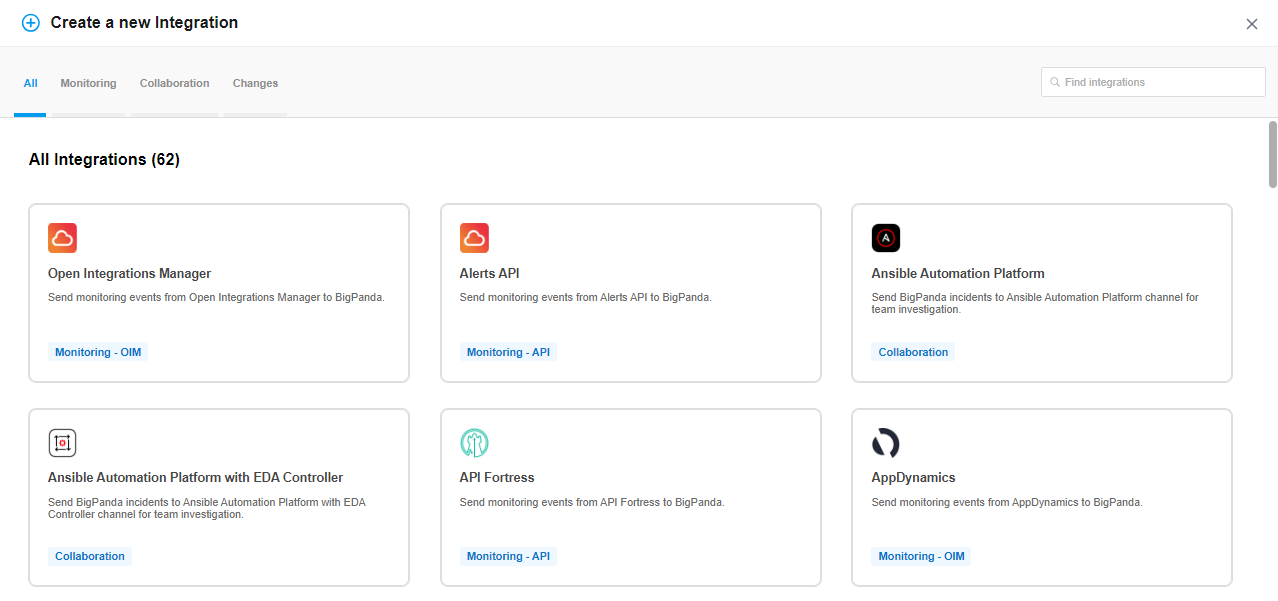 |
Integration Selection
Open Integration Manager
Some integrations have additional configuration options available through the Open Integration Manager, allowing you to adjust timestamp, status, tag fields and more. The Open Integration Manager will automatically appear as a secondary tab during Integration configuration.
App Keys
The first step in creating a new integration is to generate the app key. The app key is a unique identifier associated with the application. App keys are required for connecting BigPanda to other systems.
When generating the app key, you also select the name for the integration in the UI. When naming an integration, be sure to use a short (max 200 characters), clear name that will be understood across your organization. Keep in mind, some tools may require multiple integrations to support different configurations or subsystems and your name should make it clear which specific element the integration connects to.
Once you are happy with your integration name, click Generate App Key.
BigPanda will create an App Key and internal System ID for the integration. Both may be necessary later during integration install or configuration, so make note of both.
Integration ID
The Integration ID is automatically created from the integration name. The ID can be used in BPQL searches, and in API calls.
Once the ID is assigned, it cannot be changed.
Time-Based Alert Resolution
With Time-Based Alert Resolution, you can set up automatic resolution for orphaned or outstanding alerts to easily reduce noise and help increase MTTR.
Use the Auto-Resolve drop-down menu to select the time period for when alerts are automatically resolved. Alerts that are not updated within the auto-resolve time frame will automatically be resolved.
Initial Resolution
The default auto-resolve time is 30 days. When first turning on Time-Based Alert Resolution for an integration, all alerts older than 30 days will be automatically resolved.
The Auto-Resolve time can also be edited after the integration has been created. To edit the Auto-Resolve time, navigate to Settings, then Integrations. Find the integration from the list, and click Edit Integration to change the Auto-Resolve time.
Adjust with Caution
When a shorter time frame is selected, the new auto-resolution rule will apply to all existing alerts from that integration. Any outstanding alerts that meet the new time-rule will immediately be slotted for auto-resolution.
Validate and Troubleshoot the Integration
After first setting up an integration, compare the incidents in BigPanda with alerts in the native monitoring system. This will help ensure that data is flowing correctly into BigPanda.
This can be done by searching for incidents from a specific monitoring system over a specified time frame. From that same time frame, search within the native monitoring application. Check to make sure that alerts from all servers are entering BigPanda.
If alerts are missing, the following may be occurring:
BigPanda is deduplicating the alerts.
The alert was sent with an invalid status.
The alert was not configured to be sent. Some source systems allow you to choose what is sent to BigPanda. Confirm that the configuration in the monitoring tool is correctly configured.
The integration instance was not connected. If there are multiple instances of an integration, confirm that each one is connected to BigPanda.
See Troubleshoot an Integration for more information about fixing errors and other issues.
Inbound integrations can be deactivated to disable the integration without deleting the configuration and settings. We recommend deactivating an inbound integration before permanently disabling it.
Deactivate Inbound Integration
If you want to stop sending data to BigPanda but don’t want to delete your integration, you can temporarily deactivate it.
To deactivate an inbound integration:
In BigPanda, navigate to the Integrations tab and select the desired integration from the list. This will open integration details on the right side of the window.
At the top of the integration details, click the Active/Inactive toggle next to the application name to change the status of the integration.
In the integrations list, inactive integrations will be marked with a gray bar.
Stop sending data from BigPanda
In BigPanda, disable any settings that send data to the integrated system. This includes modifying or removing AutoShare rules or Environments that are tied to the integration.
Delete the integration in BigPanda
Take the following steps to delete the integration from BigPanda:
In BigPanda, navigate to the Integrations tab and select the desired integration from the list.
In the integration details on the right of the page, click the trash icon, then confirm you want to delete the integration. The integration will be removed immediately.
Data removal: active alerts
All active alerts from the integration will be resolved after deletion.
Outbound integrations cannot be deactivated within BigPanda. To deactivate an outbound integration without removing the configuration or settings, remove the integration from configured automations and deactivate the receiver in the destination tool.
Stop sending data from BigPanda
In BigPanda, disable any settings that send data to the integrated system. This includes modifying or removing AutoShare rules or Environments that are tied to the integration.
Delete the integration in BigPanda
Take the following steps to delete the integration from BigPanda:
In BigPanda, navigate to the Integrations tab and select the desired integration from the list.
In the integration details on the right of the page, click the trash icon, then confirm you want to delete the integration. The integration will be removed immediately.
️Data will not be removed from BigPanda or integrated systems
This procedure does not remove any data from BigPanda or the integrated system. As needed, remove data from each system before deleting the integration.
Standard integrations are any integration that has a tile in BigPanda, or uses the Open Integration Manager or Email Parser. BigPanda offers 50+ standard integrations to streamline receiving ops tools data and sharing information with your collaborators through other systems.
BigPanda 's inbound integrations make it simple to bring together monitoring, change, and topology tools. and normalize events and enrich them with deep contextual information.
BigPanda's outbound collaboration integrations communicate bi-directionally to keep ticketing, notifications, and chat tools in sync across your teams.
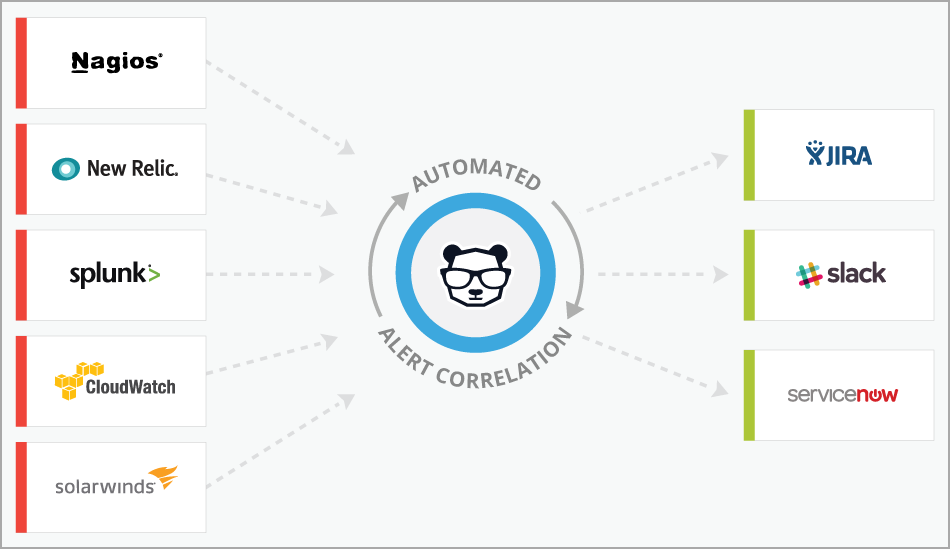 |
Full Integrated Suite
Best Practices
Before you begin to configure standard integrations, we recommend taking preparation steps to ensure a smooth launch.
For all integrations
Identify the tool version and ensure it is compatible with BigPanda.
If integrating a monitoring tool, ensure it has the ability to send outbound event notifications.
Check that the tool has access to the internet to outbound event notifications.
Check that all security requirements (such as whitelisting) are met to send traffic outside the core network.
Review the BigPanda integration instructions and requirements for your tool.
For Open Integration Manager enabled integrations
Confirm that the monitoring event payload headers and body be customized.
Check that the event headers support org bearer token authentication.
Ensure event payload bodies can be formatted in JSON.
For standard Email Parser integrations
Configure email recipients to be sent to a BigPanda inbox.
Format email bodies into text or HTML.
Ensure that email templates remain consistent between event types.
Types of Integrations
BigPanda offers several types of integrations:
Monitoring integrations allow BigPanda to receive alerts from your monitoring systems, such as Nagios, SolarWinds, and AppDynamics. Many users start by integrating these systems.
Collaboration integrations allow you to share incidents from BigPanda with your co-workers through other systems such as Jira or Slack.
Changes integrations allow BigPanda to receive change notifications from your change systems, such as CloudTrail, Jenkins, ServiceNow, and Jira.
Topology integrations allow you to enrich alerts coming into BigPanda with topology information from configuration management, cloud and virtualization management, service discovery, APM, and CMDB tools.
Agent vs. Webhook Integrations
BigPanda has the flexibility to support both SaaS and on-premise monitoring tools.
Most SaaS tools (such as CloudWatch or New Relic) are integrated using Webhooks. Whenever the SaaS tool generates an alert, it posts an HTTP message directly to BigPanda. BigPanda listens to incoming messages and processes them.
Many on-premise tools are integrated using the BigPanda agent. The agent is a low-footprint daemon installed on the master host of your monitoring tool. It consumes alerts from the tool in real time, and then transmits them to BigPanda via SSL-encrypted HTTP calls.
The agent can require some additional steps to configure. To learn more about using the agent, see the BigPanda Agent documentation.
Standard vs. Custom Integrations
Standard integrations are any integration that has a tile in BigPanda, or uses the Open Integration Manager or Email Parser. See the diagram below for more information about the difference between standard and custom integrations.
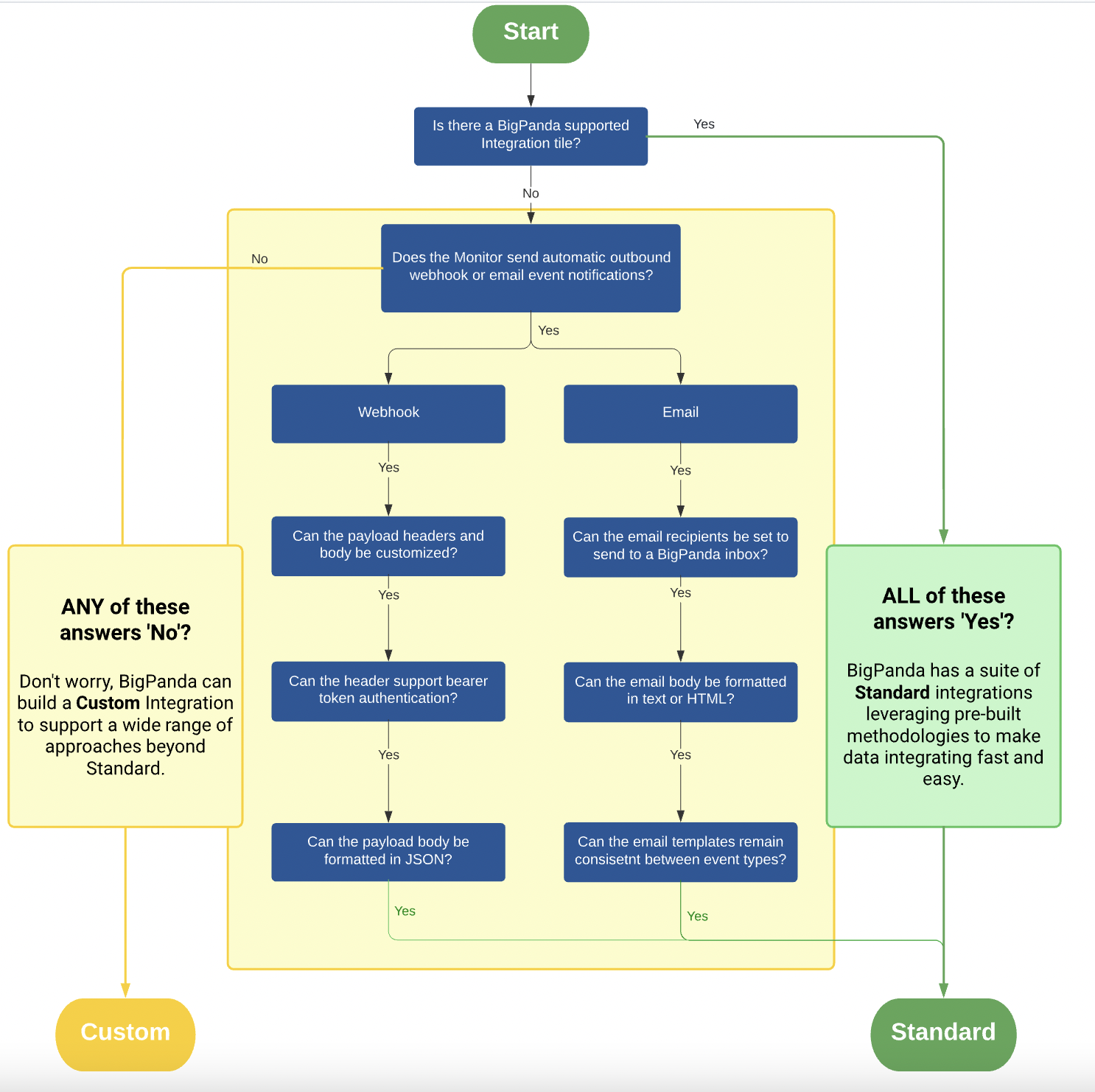 |
Deciding Between Standard or Custom Integrations
To learn about options relating to custom integrations, contact your BigPanda support or your onboarding team.
Monitoring Integrations
The following standard monitoring integrations are available:
Product | Supported Versions | Type | Authentication Type |
|---|---|---|---|
Airbrake | SaaS Deployments (Deprecated) | Webhook | |
SaaS and On-Premise Deployments | Webhook | Org Bearer Token | |
4.1+; On-Premise, Dedicated SaaS Deployments | Webhook | Org Bearer Token | |
SaaS Deployments | Webhook | Org Bearer Token | |
SaaS Deployments | Webhook | Org Bearer Token | |
9.4.x | Spectrum Scripts | Org Bearer Token | |
SaaS Deployments | Webhook | Org Bearer Token | |
SaaS Deployments | Webhook | Org Bearer Token | |
SaaS Deployments | CloudFormation, Webhook | Org Bearer Token | |
<= 4.0.4 | Webhook | Org Bearer Token | |
SaaS Deployments | Webhook | Org Bearer Token | |
SaaS Deployments | Webhook | Org Bearer Token | |
v19 to v21 | Webhook | Org Bearer Token | |
Grafana >= v5.0.0 | Webhook | Org Bearer Token | |
1, 2 | Agent | Org Bearer Token | |
Librato | SaaS Deployments | Webhook | Org Bearer Token |
SaaS Deployments | Webhook | Org Bearer Token | |
SaaS Deployments | Webhook | Org Bearer Token | |
1.98.0 | Webhook | Org Bearer Token | |
SaaS Deployments | Webhook | Org Bearer Token | |
3, 4 | Agent | Org Bearer Token | |
4, 5 | Agent | Org Bearer Token | |
SaaS Deployments | Webhook | Org Bearer Token | |
Nagios-Compatible Versions (Version 5 and older) | Agent | Org Bearer Token | |
12c, 13c | Email Parser | N/A | |
Panopta | SaaS Deployments (Depreciated) | Webhook | |
SaaS Deployments | Webhook | Org Bearer Token | |
Alertmanager >= v0.16.0 | Webhook | Org Bearer Token | |
14.4+; English Language (Only) | Webhook | Org Bearer Token | |
< 11.3.0 | Action Script/Webhook | Org Bearer Token | |
System Center 2012 R2 and 2016 | Webhook | Org Bearer Token | |
Scout | SaaS Deployments (Deprecated) | Webhook | |
Sematext | SasS Deployments (Deprecated) | Webhook |
|
0.12+ | Webhook | Org Bearer Token | |
SaaS Deployments | Webhook | Org Bearer Token | |
SaaS Deployments | Webhook | Org Bearer Token | |
<=2022.11 | Webhook | Org Bearer Token | |
v1, v2, v2c | Daemon and Agent | Org Bearer Token | |
Orion Server, Versions 2015.1+; Network Performance Monitor (NPM) 10.4+ | Webhook | Org Bearer Token | |
Splunk Enterprise, Splunk Cloud <= 9.0 | Native App (v6.3+) Action Script (pre v6.3) | Org Bearer Token | |
<= 2023.2.9 | Webhook | Org Bearer Token | |
StatusCake | SaaS Deployments (Deprecated) | Webhook | |
SaaS Deployments | Webhook | Org Bearer Token | |
SaaS Deployments | Webhook | Org Bearer Token | |
7, 8 | Agent | Org Bearer Token | |
<=8.10 | Webhook | Org Bearer Token | |
SaaS Deployments | Webhook | Org Bearer Token | |
2.2, 3.0, 3.2 | Agent | Org Bearer Token | |
Zenoss Core 4, 5, 6 | Agent | Org Bearer Token |
Collaboration Integrations
The following standard monitoring integrations are available:
Product | Supported Versions | Type | Authentication Type |
|---|---|---|---|
<= v2.4 | Webhook | Org Bearer Token | |
SaaS Deployments | API | User API Key | |
Jira Cloud <= 9.4 | API | User API Key and Org Bearer Token | |
SaaS Deployments | API | User API Key | |
SaaS Deployments | API | Org Bearer Token | |
BigPanda App v2.8+ - Xanadu, Washington, Vancouver, Utah, Tokyo, San Diego, Rome, Quebec, Paris, Orlando, New York, Madrid, London, Kingston, Jakarta, Istanbul BigPanda App v2.3-2.7 - Washington, Vancouver, Utah, Tokyo, San Diego, Rome, Quebec, Paris, Orlando, New York, Madrid, London, Kingston, Jakarta, Istanbul BigPanda App <v2.3 - Quebec, Paris, Orlando, New York, Madrid, London, Kingston, Jakarta, Istanbul | API | User API Key and Org Bearer Token | |
SaaS Deployments | API | Org Bearer Token | |
<= Jun/Jul 2022 | API | User API Key |
Changes
Product | Supported Versions | Type | Authentication Type |
|---|---|---|---|
SaaS | API | User API Key | |
1.546 or later | Native Plugin, Webhook | User API Key | |
Jira Cloud, Jira Server | Native App, Webhook | User API Key and Org Bearer Token | |
Tokyo (v2.3+), San Diego (v2.3+), Rome (v2.3+), Quebec, Paris, Orlando, New York, Madrid, London, Kingston, Jakarta, Istanbul | Native App, API | User API Key and Org Bearer Token |
Topology
Product | Supported Versions | Type | Authentication Type |
|---|---|---|---|
SaaS | API | Org Bearer Token | |
SaaS Deployments | API | Org Bearer Token | |
Tokyo (v2.3+), San Diego (v2.3+), Rome (v2.3+), Quebec, Paris, Orlando, New York, Madrid, London, Kingston, Jakarta, Istanbul | Native App, API | User API Key and Org Bearer Token | |
vCenter Server 6.5 update 2 and newer | Native Plugin | Org Bearer Token |
In order for BigPanda to receive events from your monitoring tools, each integration must be correctly configured. With certain configuration issues, the payload will fail and the event information will never appear in BigPanda, instead triggering an error. These failed events will not be correlated into alerts or appear in the BigPanda incident feed.
If an issue or problem occurs with integration payloads, BigPanda allows you to troubleshoot errors and issues right in the console. BigPanda will automatically mark integrations with failed payloads on the Integrations tab. Review these errors to identify and troubleshoot integration issues so that no events are missed.
Limited Time Frame
Errors are only shown in the UI for seven days. We recommend checking regularly to ensure that no events are falling through the cracks, especially during the first few weeks with any new integration.
Troubleshoot an Integration
Integration errors can be seen and investigated on the Integrations tab.
Any integration that has a failed payload in the last seven days will list the number of errors on the integration ribbon. If a payload failed within the last 24 hours, this number will be highlighted in red.
To troubleshoot an integration:
Navigate to the Integrations tab.
The Integrations List shows the name and recent activity for each installed integration.
Multiple Integrations for a Single Tool
If you’ve configured multiple integrations for the same tool, each integration is listed separately in the left pane.
(Optional) Filter the list by searching for an integration name.
Click the desired integration to see more details in the right pane, including App Key, ID, Errors, and more.
Click Troubleshooting to view details on errors. The Errors field lists a count of recent event payloads that triggered issues on arrival in BigPanda.
Integration Status
Integrations that have not yet received data are marked with an orange No Data label.
Error Details
The Integrations Troubleshooting log only tracks errors that are received by BigPanda. Errors that fail to send or that cannot be parsed by the BigPanda pipeline will not appear in the list.
Error count and details are only maintained for seven days.
The Troubleshooting log provides additional information about the error to help you find the configuration issue in the source tool. You can search the Troubleshooting log to find specific information about an event or payload. The troubleshooting log can be filtered by searching for an existing payload description, or by filtering by date.
Identifying when the integration stopped working
The Last Event label can help you identify timelines using the time the last successful event was received. For integrations that have never received a payload, the Last Event will show the creation time of the integration.
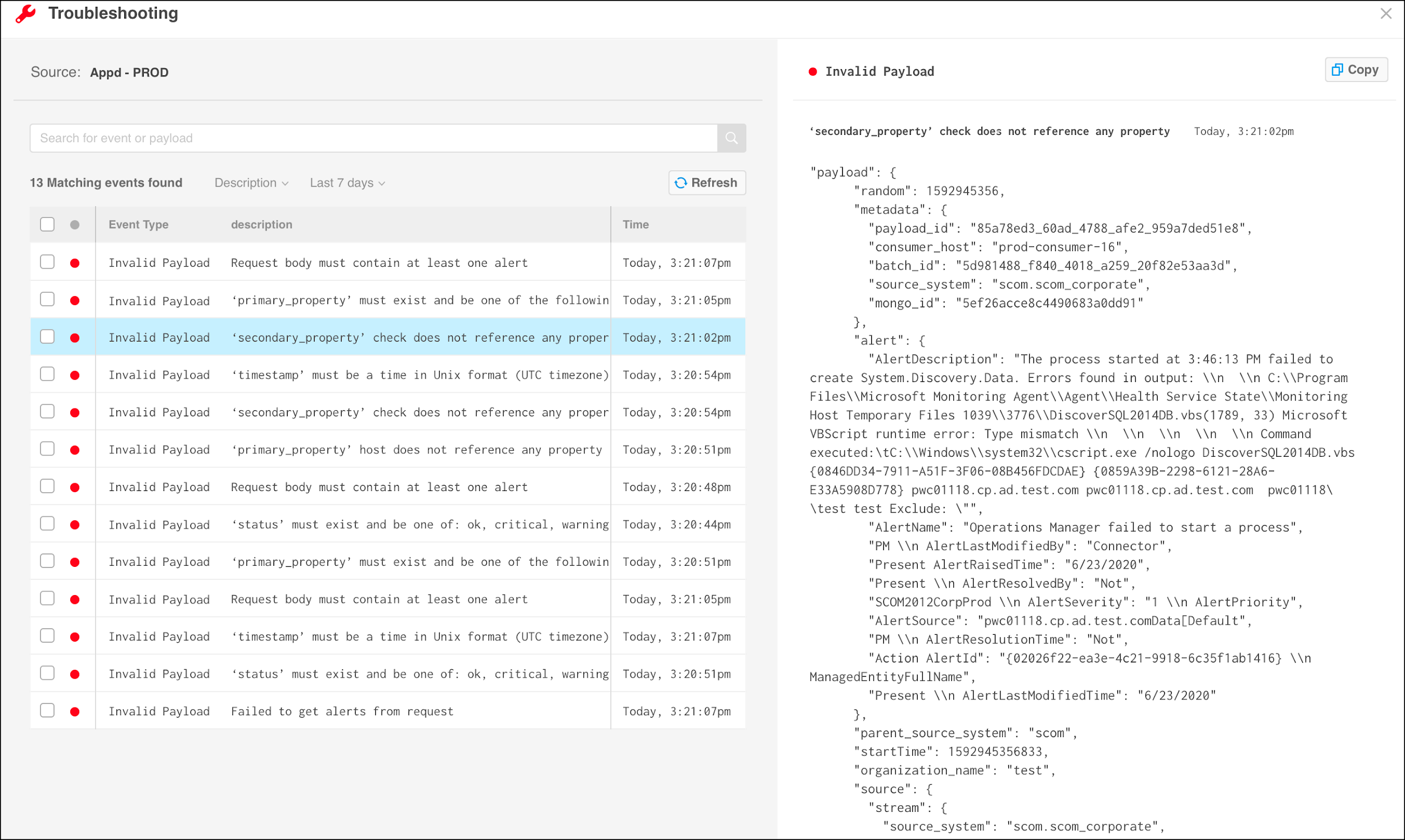
The Troubleshooting Log
Payload Details
To view the payload in a code editor of your choice, click Copy to add the payload to your clipboard.
Once the issue has been identified, reconfigure the source tool or the integration to fix the parsing errors.
Error Types
Error type | Description | Explanation |
|---|---|---|
invalid_payload | Request body must contain at least one alert | The request body is empty. Check the configuration of the monitoring system to ensure it does not send an empty payload. |
invalid_payload | ‘primary_property’ must exist and be one of the following: host, service, application, device | A primary property is missing. This is a mandatory field that defines how an incident title appears in BigPanda. Make sure each event is sent with one of the following fields: host, service, application, or device. |
invalid_payload | ‘primary_property' X does not reference any property | The primary property is mentioned in the payload, but it is not related to a specific entity. The host, service, application, or device must be designated. |
invalid_payload | ‘secondary_property' X does not reference any property | A secondary property is mentioned in the payload, but it is not related to a specific entity. The check or sensor fields must be designated. |
invalid_payload | 'timestamp' must be a time in Unix format (UTC timezone) | Fix the timestamp format to match the UTC timezone definition. |
invalid_payload | ‘status' must exist and be one of the following: ok, critical, warning, unknown, acknowledged | An improper status field was sent in the payload. Make sure that only one of the following options for status is used: ok, critical, warning, unknown, and acknowledged. |