Improved AI Incident Assistant and Prevention Web App
The web app has been restructured and rebuilt around a new composable agent architecture. Instead of following fixed, hand-wired procedures, Biggy now reasons through each request and assembles the right combination of agents, skills, and capabilities to answer it. As a result, Biggy can handle more of your operations automatically.
This update adds new ways to teach Biggy how your organization works, automate procedures that must run the same way every time, and keep humans in control of every significant action.
Biggy works across web chat, Slack, and Microsoft Teams, with out-of-the-box support for 18+ observability and ITSM integrations, and an interactive walkthrough helps new teams get productive from day one.
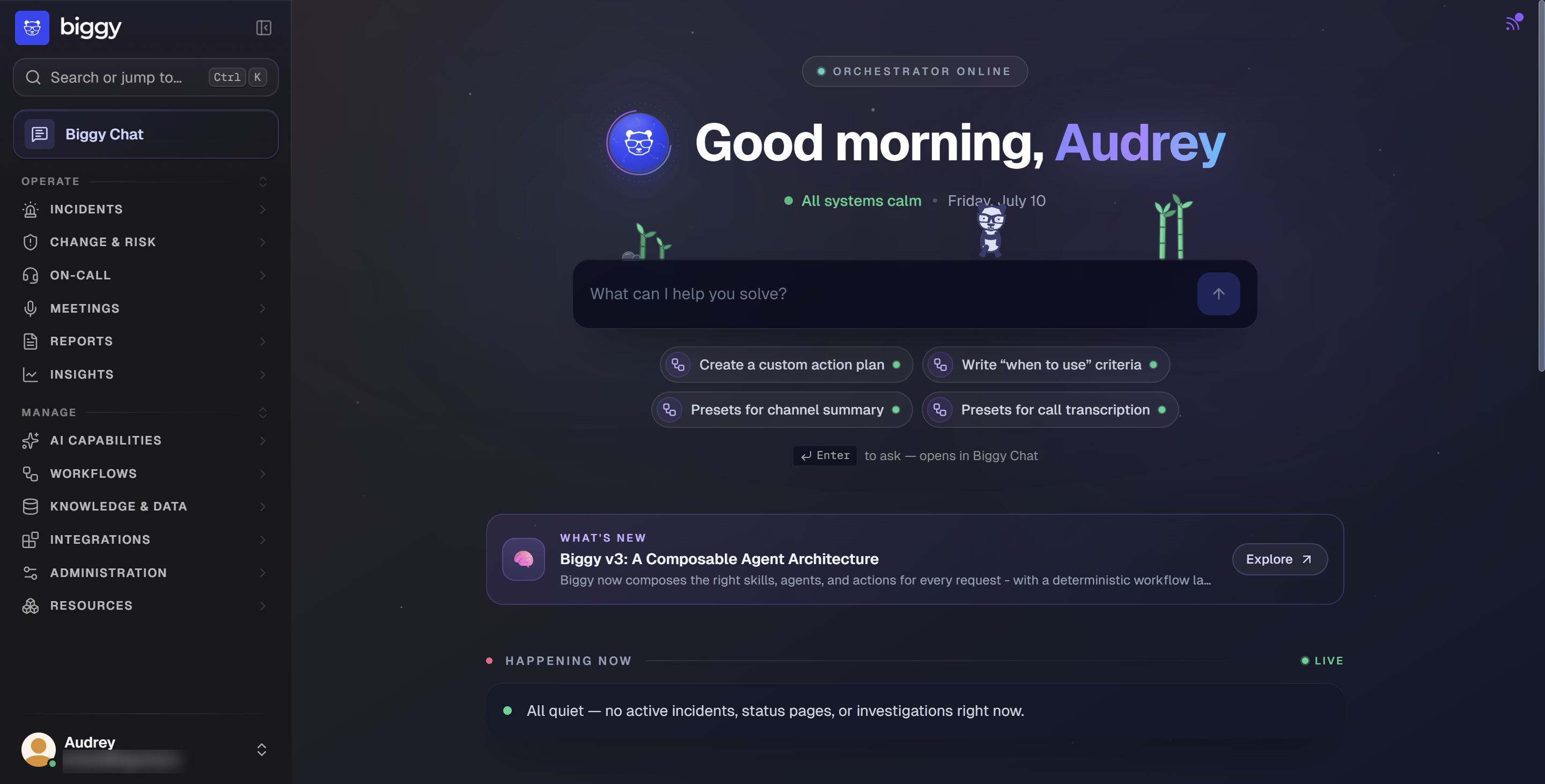
What's new
Updated agent architecture: A reasoning core dynamically composes agents, skills, and capabilities for every request instead of following fixed action plans.
Improved navigation: The new layout groups pages by operational topic, making it easy to find what you need.
Actions: A dedicated configuration section with individual settings pages for each of Biggy's major built-in actions.
Skills: Teach Biggy your team's playbooks once and have it apply them everywhere automatically.
Custom agents: Build purpose-built AI specialists with their own persona, tools, and scope.
Visual workflows: Design multi-step automations on a node-based canvas for processes that should run the same way every time.
Adaptive memory: Biggy learns from every incident it helps resolve and applies those lessons automatically.
Human-in-the-loop (HITL) approvals: Biggy pauses and asks for confirmation before it takes any significant action.
Action plan replacement
In the new web app, Action Plans are being replaced with Actions, Agents, and Skills. No migration tasks are required. All existing configurations, including custom builds, will be migrated automatically to the new web app.
What this upgrade means for your team
The upgrade is designed to be a smooth transition:
End users keep working the same way: You can continue prompting Biggy through web chat, Slack, and Microsoft Teams. Responses are faster and more consistent, and you can ask more flexible questions.
Nothing to rebuild: Existing Action Plans, prompt addendums, workflows, and custom builds will be migrated automatically to the new web app. No manual recreation is required.
Guided onboarding: In-product tours and walkthroughs introduce new features as you encounter them.
Updated agent architecture
The way Biggy answers questions has been rebuilt. Instead of running a fixed action plan, Biggy now uses a reasoning core, the Orchestrator, that reads each request, determines which capabilities to involve, and composes a grounded answer. Most tasks that previously required a manually configured action plan are now handled automatically.
Biggy is now built on a set of core components:
Orchestrator: The reasoning core. It reads each request, reasons across your integrations, picks the capabilities it needs, and composes a grounded answer. The Orchestrator is the default path for every conversational interaction, in chat or triggered automatically.
Capabilities: The building blocks the Orchestrator calls. A capability is either an Action (a built-in action or utility, such as creating an ITSM record) or an Agent (an integration specialist, such as ServiceNow, Datadog, Splunk, Dynatrace, or a custom agent).
Skill: Templates and guidance you write once, and Biggy determines when to use them based on context.
Workflow: Explicit, guaranteed step sequences for procedures that must run the same way every time.
Trigger: Schedules and events that start the Orchestrator, a capability, or a workflow automatically.
Smart effort tiers
Every request is triaged into a quick answer, a focused lookup, or an intensive investigation, and Biggy invests effort accordingly. Trivial questions answer instantly, and complex ones get deep, multi-tool investigation. The effort tier is visible on each answer and flows into usage analytics.
Live progress and preliminary answers
During longer investigations, Biggy narrates what it is doing step by step. It can post a preliminary answer after its first round of research and then refine it, and it shows a visible task plan for intensive investigations, including spawning parallel sub-investigations.
Human approval for every write action
Any action that changes an external system, such as creating or updating a ticket, resolving a BigPanda incident, or calling a tool that mutates data, pauses and asks a human to approve first. Native approval cards appear in the web app, Slack, and Microsoft Teams.
See exactly what will be written: The approval card shows exactly what Biggy plans to write and shows the agent's reasoning read-only.
Edit before anything happens: The approver can edit values field by field before approving. In Slack and Microsoft Teams, draft edits are applied deterministically, so what you type is exactly what is sent. Editing the values invalidates a stale approval.
Extra friction for destructive actions: Destructive actions, such as resolving an incident, require extra confirmation.
Approvals survive restarts: A pending approval is preserved even if the service restarts.
Unattended runs fail closed: Scheduled or triggered runs fail closed on write actions unless the action is explicitly allowed for that automation.
Layered safety guardrails
Every request passes a safety check before Biggy acts. A built-in safety classifier always runs, and your organization can enable an authoritative guardrails service with always-on protections, optional organization-toggleable guards, and custom policies with exceptions.
Always-on protections: Six always-on protections cover prompt injection, hate, violence, sexual content, malicious intent, and credential exposure.
Optional guards: Eight optional guards cover personally identifiable information (PII), financial content, health content, profanity, strict off-topic, external URLs, investment advice, and legal advice.
Custom policies: Write custom policy and exception text to match your organization's rules.
When an answer is blocked, PII is redacted and the blocked turn is recorded correctly in usage analytics.
Improved navigation
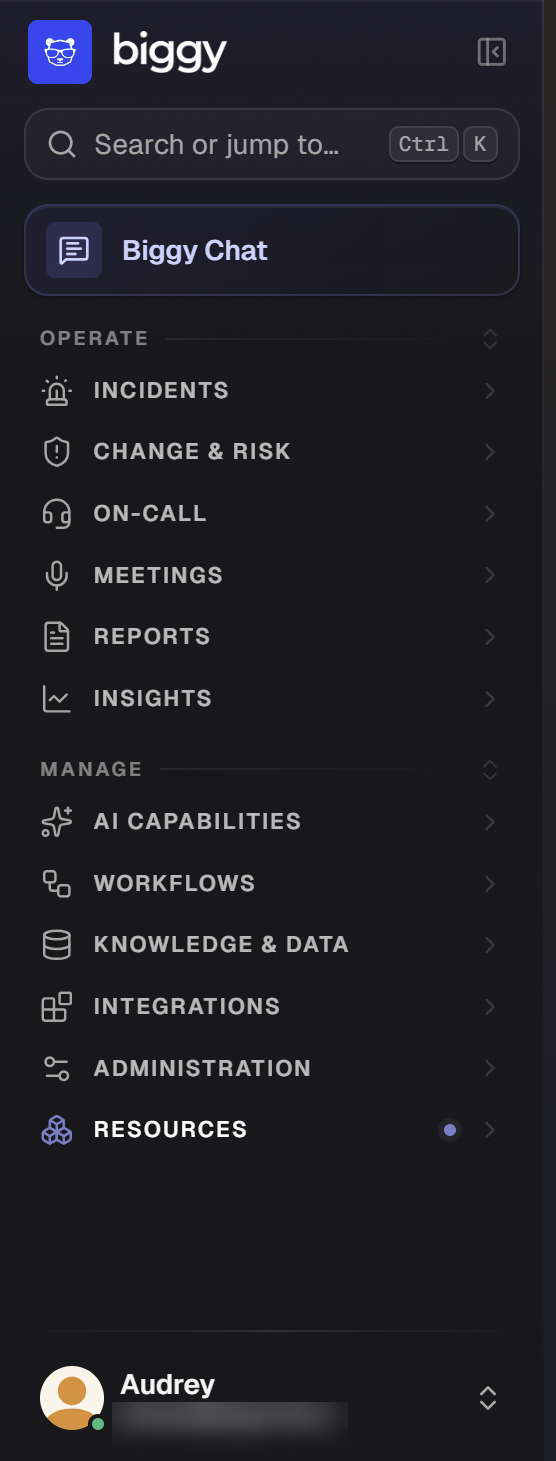
The web app navigation has been reorganized so related pages live together, and Biggy Chat is now the primary entry point at the top of the menu. Related pages live together regardless of which module they technically belong to, and most pages you already use are still here; many just have a new home or an updated name.
Pages are grouped into two main sections:
Operate: Incidents, Meetings, Reports, and Insights.
Manage: AI Capabilities, Workflows, Knowledge, and Integrations.
Renamed and Combined Pages
New Page Name | Old Page Name |
|---|---|
Action Plans | |
Action Plans | |
Action Plans | |
Channel Hawks Scheduled Workflows | |
Learned Knowledge | |
Remote Connections | |
Integrations | |
Core BigPanda | |
Trigger Actions |
New Pages
Page | Description |
|---|---|
Interactive catalog containing every agent, action, and utility in one place. | |
Long-running multi-source investigations. | |
Admin view of everything Biggy has learned. | |
Persistent, shareable HTML reports generated by Biggy. | |
Browse, share, and manage canvas documents generated in Biggy Chat. | |
Billable activity breakdown and usage view. | |
What's New | Announcements and guided tours for new features. |
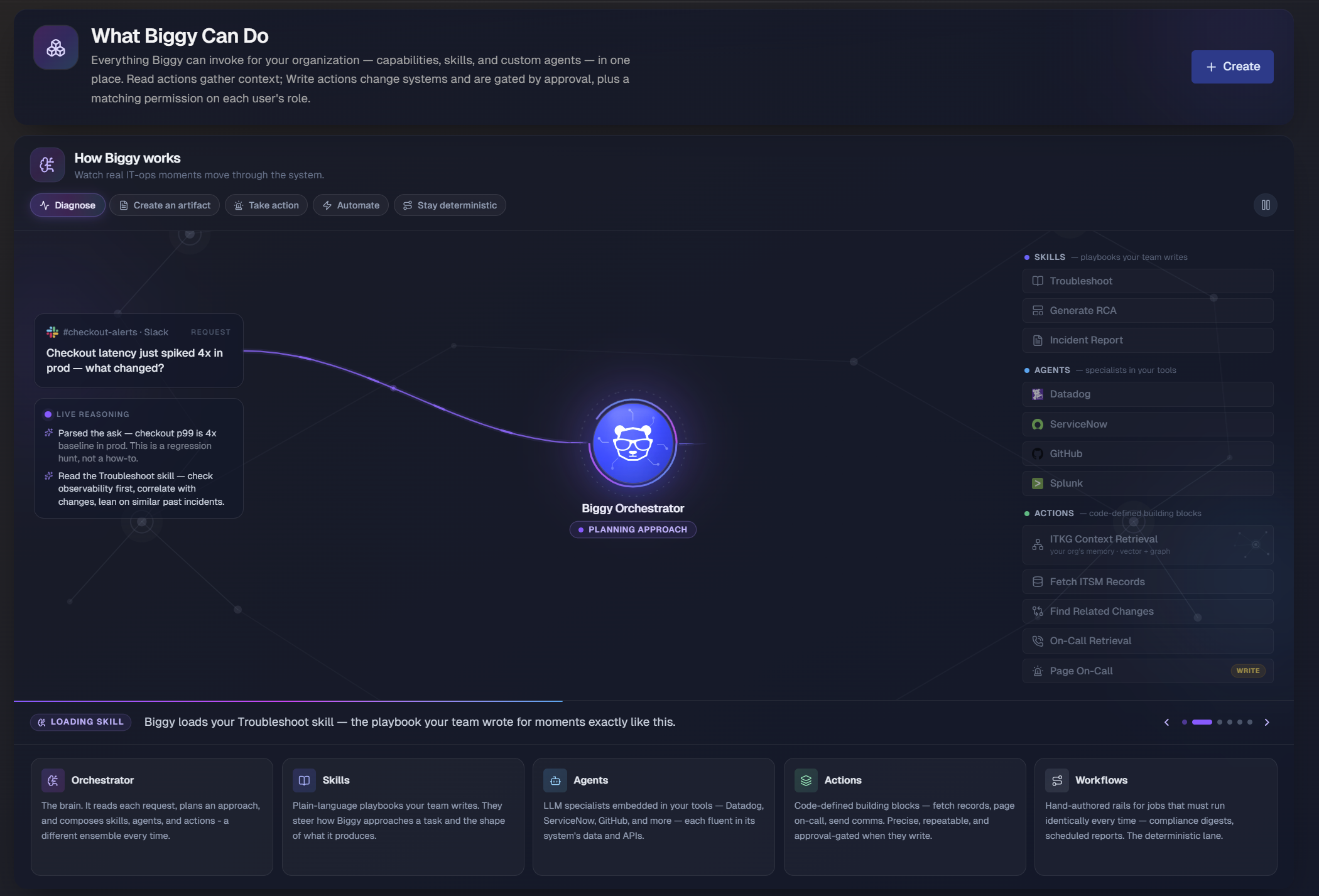
What Biggy can do: the capability catalog
Everything Biggy can do is now an individually governed capability. A single page, What Biggy Can Do, lists every capability in your organization, grouped into agents (tool-backed assistants), actions, and utility actions, alongside your skills and custom agents. Admins enable or disable each capability and scope tool-backed capabilities to specific connected accounts.
Actions
The Actions page is a dedicated configuration area with individual settings pages for each of Biggy's major built-in actions.
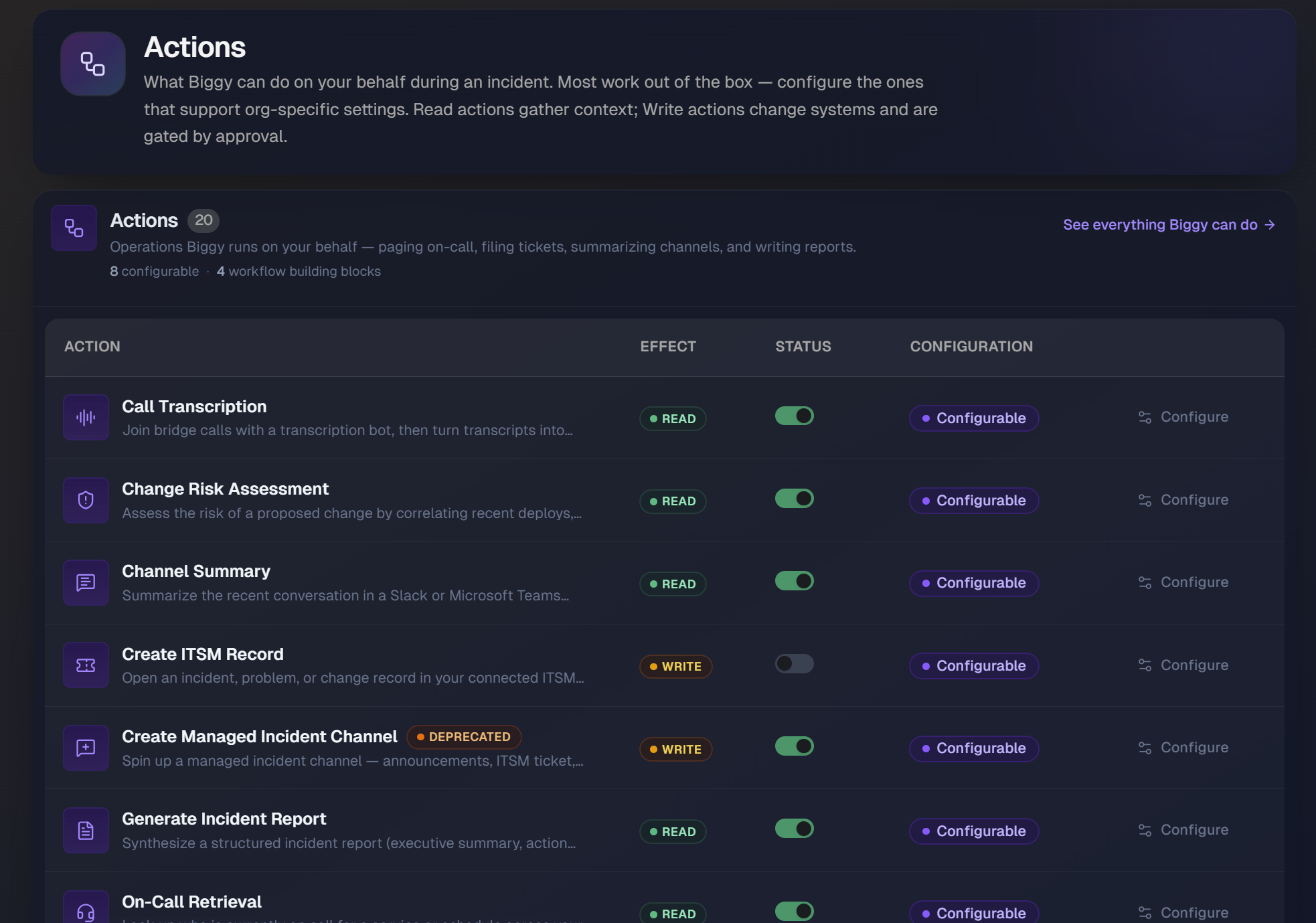
It replaces scattered, hard-to-find configuration fields with a purpose-built home for each capability, including Channel Summary, Incident Channel, Create ITSM Record, Update ITSM Record, and On-Call Retrieval.
From these pages, your administrators control how each action behaves. For example, define which ITSM system and record type Biggy creates by default, or which on-call providers Biggy queries when someone asks who is on call. Because actions are now standalone building blocks, they can be invoked from chat, a skill, or a workflow, rather than being locked to a single context.
Skills: your team's playbook library
Skills are a structured way to define approaches for specific situations and what your deliverables should look like. A skill specifies how your team writes a root cause analysis (RCA), what an executive summary must cover, or how to approach a type of problem. Once a skill exists, Biggy applies it everywhere, and the Orchestrator automatically selects the right skill for each job.
The new web app has 13 ready-to-use skills, including Generate RCA, Executive Summary, After-Action Review, Troubleshoot, Incident Report, Status Update, 5 Whys Analysis, and ITIL Problem Management.
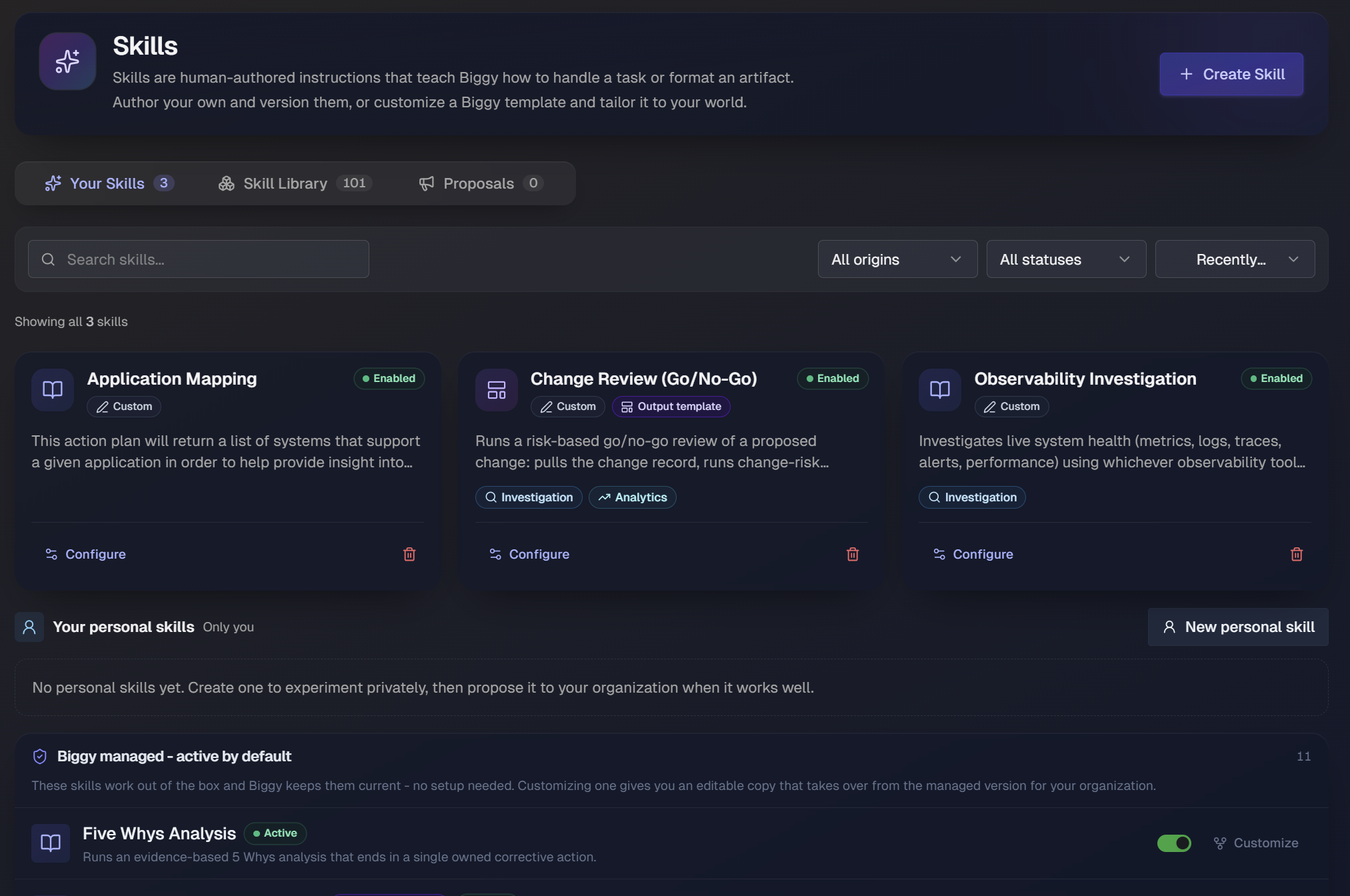
You can also extend the library:
AI-assisted skill creation: Describe what you want in plain language, and Biggy drafts the skill for you.
Adopt and customize built-ins: Take any built-in skill and tailor it to your organization's standards without having to start from scratch.
@mention in chat: Type
@SkillNameto direct Biggy to follow a specific playbook for your current question.Full version history: Every save is tracked with author and timestamp, and you can restore any version in one click.
Skill usage analytics: See which playbooks the Orchestrator reaches for most often across your organization.
Custom agents
Your organization can now build and deploy its own purpose-built AI specialists with Custom Agents. The Orchestrator handles most questions directly and delegates to a custom agent when a request needs deep expertise in a specific tool.
Each custom agent gives you:
Custom persona and instructions: Give each agent a name, a description of what it specializes in, persona instructions, and default style guidance. The Orchestrator uses the description to decide when to delegate.
Scoped integration access: Grant each agent access to a specific subset of your connected integrations to keep its scope precise. Read-only capabilities are unrestricted, and write actions require explicit approval.
AI-generated avatars: Biggy generates a custom avatar for each agent, which can be adjusted as needed.
Swarm-eligible agents: Mark any agent as available to Biggy's autonomous Swarm investigations so it can contribute its expertise during complex, multi-step investigations.
Role-based access controls: Set which users can create agents and which users can invoke specific agents using role-based access control (RBAC).
Live preview before publishing: Test an agent's behavior interactively in the Agent Preview panel before it goes live for the rest of your organization.
Workflows: a visual automation builder
The Workflow builder has been rebuilt as a visual, node-based canvas. Use a workflow when a procedure must follow the same steps every time, such as an approval-gated runbook, a compliance digest, or a scheduled audit.
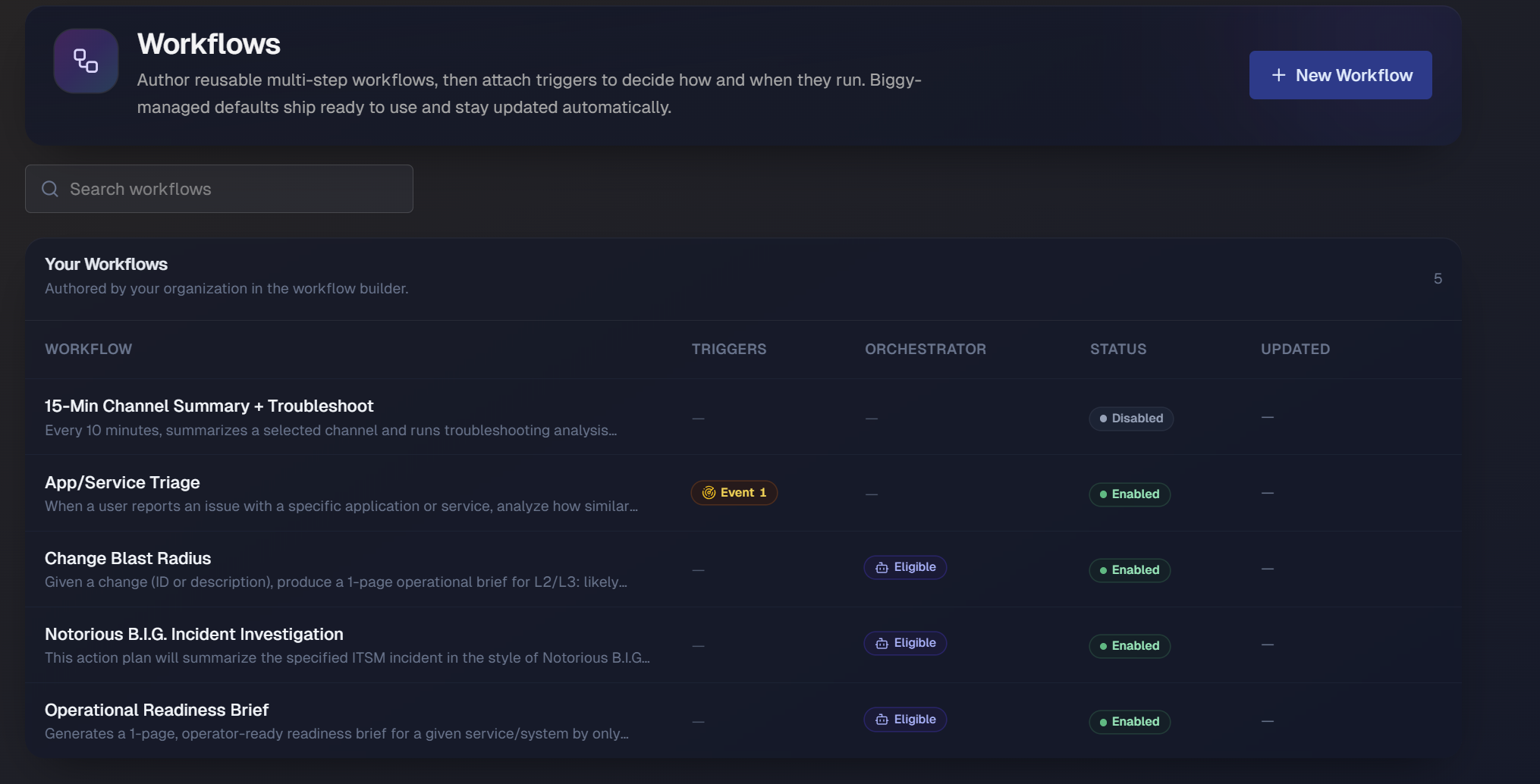
Workflows are now decoupled from their triggers, so you can define a workflow once and attach it to one or more triggers, and the Orchestrator can invoke it too.
Build workflows from six types of nodes:
Action: Calls any capability, such as an integration agent, a built-in action, or a utility.
Prompt: Uses AI to analyze, transform, or compose over the outputs of earlier steps.
Branch: Routes the workflow down different paths based on what prior steps returned.
Approval: Pauses and asks a person to approve before continuing. If no one responds, the workflow closes.
Wait / Timer: Pauses the workflow for a set duration, then resumes automatically.
Abort: Stops the workflow when a condition means it should not continue.
Output: Shapes and delivers the final result to the user or destination.
Additional workflow capabilities include:
AI-powered workflow generation: Describe what you want in plain language, and Biggy builds the initial step graph for you.
Dry runs and test runs: Validate a workflow before it runs against live systems.
Default workflow catalog: Every new organization starts with a pre-loaded catalog of commonly needed automations.
Run from chat or on a trigger: Start a workflow with the
/run-workflowcommand in chat, or fire it on a schedule or event.Full version history: Every workflow definition is tracked, with one-click restore to any prior version.
Workflows are automatically migrated
Workflows from the previous version of the web app are automatically migrated to the new format, so your team does not need to rebuild them by hand.
Deep Research
Deep Research is a dedicated background research mode for the questions that deserve minutes of parallel investigation instead of seconds. Toggle it in the composer or use the slash command, submit one question, and Biggy scopes it, plans, fans out multiple scoped sub-investigations across your connected tools in parallel, reflects on coverage, and delivers a long, citation-backed report into your chat minutes later.
Durable progress: Live progress streams the whole time and survives page reloads. Runs appear in chat history with status, and a research hub lists your runs.
Stop anytime: You can stop a run at any point, even mid fan-out, and still receive a partial report.
Graceful limits: Internal cost and runtime circuit breakers deliver partial reports rather than failing.
There is no admin configuration for Deep Research. It is opt-in per question through the composer toggle or the slash command.
Adaptive memory
Biggy now builds and maintains an organizational memory of what it has learned from real incidents and investigations in Adaptive Memory. This memory operates at both the user and organizational levels, depending on the type of knowledge.
This is distinct from your documentation: it is the operational experience Biggy accumulates over time. Biggy automatically recalls this memory with every request, so it continues to improve without extra effort from your team.
Adaptive memory captures four types of knowledge:
Facts: Durable, current-truth relationships, such as which services depend on which databases and who the right person to page is. Superseded facts are retired automatically so Biggy never acts on stale information.
Proven approaches: Learned operational how-tos, such as always including business impact in the first message when paging a specific on-call team.
Learned mistakes: Lessons from actions that caused problems, applied as guardrails rather than suggestions.
Episodes: Full situation, action, and outcome records of past incidents that Biggy retrieves when a similar pattern appears.
Memory you can trust and audit
Every fact and procedure links to its source conversation or investigation, its confidence level, and how many times it has been reinforced. A dedicated admin page surfaces everything Biggy has learned, so your team can review and trust it.
Adaptive memory is distinct from your indexed documentation. Runbooks and wikis stay in knowledge, while agentic memory stores what Biggy learned from experience. The two reinforce each other, and neither replaces the other.
Dreaming
Dreaming is a background process that consolidates memory between conversations: it reads many past episodes at once, distills higher-level lessons, refreshes time-sensitive facts, and prunes what it has already absorbed. The result is a continuously self-curating knowledge graph.
A richer web chat experience
The Biggy Web Chat adds several features for organization and collaboration:
Canvas: Create and collaborate on documents such as RCAs, incident reports, and executive summaries, directly inside a conversation. Biggy streams the document into a live editor next to the chat, where you can edit it manually or ask Biggy to refine the whole document or a selected passage. A side-by-side diff lets you review AI-suggested rewrites before you accept them, and full version history preserves every draft.
Chat sharing: Share any conversation at View-only, Collaborate, or Owner access, and manage or revoke sharing at any time. Recipients can fork a conversation to create their own copy.
Chat folders: Organize conversations into named, color-coded folders from the history panel.
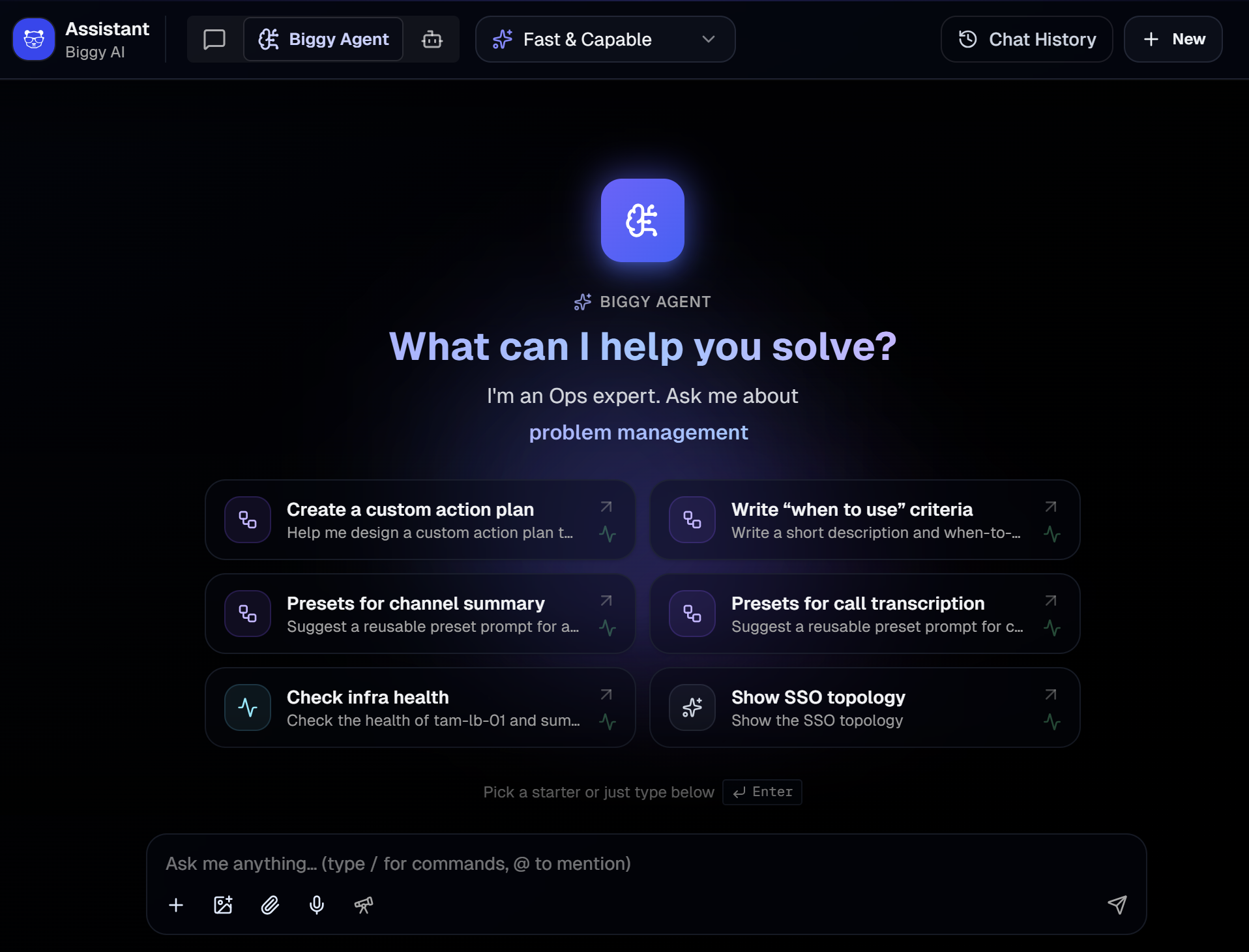
Personalized chat starters: The welcome screen refreshes daily with suggestions based on how your organization actually uses Biggy.
Chat interaction upgrades: See Biggy's reasoning live, trace sources with a source attribution strip, follow up with suggested prompts, and use slash commands and
@mentionsfor skills and agents.
Slack and Microsoft Teams
Both chat platforms run the same reasoning agent, with live streaming answers, native approval cards, and more reliable long-response handling.
Streaming in Slack: Slack answers stream live, and very long answers rotate cleanly across multiple messages with a lossless threaded fallback instead of truncating or erroring.
Microsoft Teams on the modern SDK: Teams chat runs the same reasoning agent with live streaming, and the integration moved to Microsoft's modern SDK to improve reliability of message delivery, proactive notifications, and channel operations.
Microsoft Copilot support: Biggy can be reached through Microsoft Copilot.
Approved chat bot accounts: Your organization can approve specific bot accounts to talk to Biggy in Slack and Microsoft Teams, so trusted automations can converse with Biggy without a human in the loop.
Major incident response
Scheduled and template-driven major-incident actions, such as status updates, summaries, and reports, now run on the same reasoning agent as chat. Template authoring offers a curated, incident-safe set of actions with sensible defaults, and chat inside incident-linked channels is incident-context-aware.
Lifecycle upgrades: The major-incident lifecycle adds a Mitigated state with impact-duration and time-to-mitigate metrics, priority reassignment from Slack, automatic retrospective-ticket creation on resolution, and one-off ad-hoc actions you can run against a live incident without editing its template.
Smarter war-room membership: When creating an incident, Biggy suggests which teams to involve and which chat user groups to bring in, drawing on service-catalog ownership and who was involved in similar past incidents, and can invite them in one flow. A member roster shows everyone in the incident and why they were added, and it flows into the incident report.
Quality-of-life improvements: Configurable banner content detail, a unified closure confirmation with optional linked-artifact cleanup, visible execution status to prevent duplicate runs, and a configurable maximum incident run time per organization.
More new capabilities
This release includes a range of additional features and enhancements:
Settings change history: Every change to a Biggy configuration is tracked across Action Plans, Skills, Workflows, Actions, and Guardrails, with full history, diffs, one-click restore, and protection against overwriting a teammate's in-progress edits.
Rebuilt agent activity timeline: The live view of what Biggy is doing now has phase sections, evidence chips showing the data sources Biggy referenced, a live timer, and a run receipt summarizing steps taken, time elapsed, and cost.
Deep Research: Start a deep, multi-source investigation in the web app that runs in the background while you keep working, using the
/deep-researchcommand.Meetings: Add Biggy to a call from a dedicated web page by pasting a meeting URL and choosing a summary channel, with independent transcription toggles for standard calls and major-incident channels.
Catalog and What's New: Browse all capabilities, skills, and agents in a unified catalog, and follow guided tours for each major release in What's New.
Analytics enhancements: New Activity Type Breakdown and Skill Usage Breakdown charts, plus a Workflow Runs tab showing run history and outcomes.
Billing usage view: An admin page showing billable Biggy activity, with totals, status breakdown, expandable detail rows, and filters.
Downdetector integration: Biggy can query Ookla Downdetector as an additional external observability source during incident investigation.
Model Context Protocol (MCP) improvements: Every connected MCP server appears as its own tool with its own logo and its own
@-mention in chat and in the skill editor. Server-declared descriptions and instructions are pulled in automatically to improve routing, and MCP tools that mutate data are approval-gated like any other write.Usage analytics rebuilt: Analytics now speak the V3 language, with activity, adoption, effort-tier mix, capabilities, skills, agents, and deliverables, plus a granular per-request usage table and a per-request trace explorer. Historical action-plan-era analytics remain available on a separate legacy view.
App-wide design and performance refresh: A systematic visual and performance pass across the web app, with user feedback moved to a sliding scale, real error states instead of silent empty screens, server-side pagination on large lists, consistent analytics time-range behavior, and mobile and accessibility fixes. The QuickStart guides were rewritten for V3 with printable PDF versions.
Python code execution: Biggy can write and run Python in a locked-down, no-internet sandbox to do math, statistics, data transforms, and time-window calculations reliably instead of estimating. Built-in calculator and time-difference tools handle the simple cases. Toggle it as a utility action in the Actions hub or Catalog.
File reading: Attach a log, CSV, JSON, PDF, Word, Excel, or email file to your message in Slack, Microsoft Teams, or the web app, and Biggy reads and reasons over it.
Native charts in answers: When an answer involves quantitative data, Biggy can render a real pie, bar, line, or area chart natively on each surface, alongside the written answer.
Update BigPanda incidents from chat: Biggy can resolve a BigPanda incident, add a comment, or set incident tags on request. Each action is individually allowlisted by admins on the BigPanda configuration page, with a choice between require-approval (the default) and auto-apply. All actions are off by default, and resolving gets extra destructive-action friction.
Create and update ServiceNow and Jira tickets: Biggy drafts ticket creations and updates, including Jira status transitions, that a human reviews and can edit field by field before anything is written. Admins can provide table and project hints so drafts land in the right place. Organizations with custom ServiceNow change-number prefixes are fully supported, and empty or drifted drafts fail closed instead of writing partial tickets.
Command launcher and slash commands: Deterministic command flows, such as channel summary, create incident channel, and generate incident report, are launchable via a picker or slash shortcuts on all surfaces, with context pre-filled where possible.
Knowledge, knowledge graph, web, and outage intelligence: The retrieval family ships as governed capabilities: semantic search over your indexed runbooks, wikis, ITSM records, and chat knowledge; the IT Knowledge Graph (ITKG) with topology, dependency-chain, and blast-radius tools; web research; and public outage intelligence covering cloud, ISP, power, and weather sources. Knowledge search now reports when named systems were searched for but not found instead of guessing.
What's changing and action required
Most configuration converts automatically. The items below deserve a review or a small action on your side.
Your configuration converts automatically: At upgrade, each organization's action plans, custom plans, workflows, and roles are converted to the new building blocks. Conversions are additive and reversible, and anything that cannot be mapped faithfully is flagged for human review rather than guessed. After upgrade, review the converted Catalog, Skills, Workflows, and Roles pages.
Custom action plans become editable skills: Every custom action plan with instructions becomes an organization-owned skill that preserves those instructions, appearing in the Skills list and
@-mention catalog like any custom skill. Custom plans with empty instructions are skipped and flagged for authoring.Legacy workflows convert and near-duplicates consolidate: Legacy channel-watch and scheduled workflows are translated into whichever construct fits best, and families of near-identical workflows collapse into one definition. Anything quarantined by the conversion needs manual review.
Major incident permission: Starting a major incident is now its own permission, granted to the System Admin and default Standard User roles. Users on custom roles who could start a major incident before may not be able to after migration, so verify who needs the grant.
Retired concepts, no replacement needed: General question-answering no longer needs a permission or a plan; it is just Biggy answering. Internal routing plans that were never user-facing were removed, Procedures are now labeled Actions, and assistants are now labeled agents.