Onboard the L1 Agent
BigPanda's L1 Agent replaces manual L1 operations with an autonomous AI agent that triages, routes, and escalates incidents without human intervention. With the speed and accuracy that only AI can bring, the L1 Agent helps your team reduce operational costs and accelerate incident response around the clock.
Onboard the L1 Agent into your incident management workflows with these short steps:
Best practices before you begin
The L1 Agent works best with these additional elements:
Unified Data Connector (UDC): Connect a historical UDC sync to an ITSM platform, ServiceNow or Jira to add ticket history for more accurate incident routing.
Assignment Incident Tag: Choose an incident tag to hold the routing decision L1 Agent makes. Use an existing tag or create a new one.
Clear Integration Names: Name each ServiceNow integration after its assignment group so L1 Agent can route to the correct one directly. Relevant only with multiple integrations.
Add the L1 Agent to ServiceNow
The ServiceNow - BigPanda L1 Agent tab brings incident context, recommendations, and actionability right into the ServiceNow incident management screen:
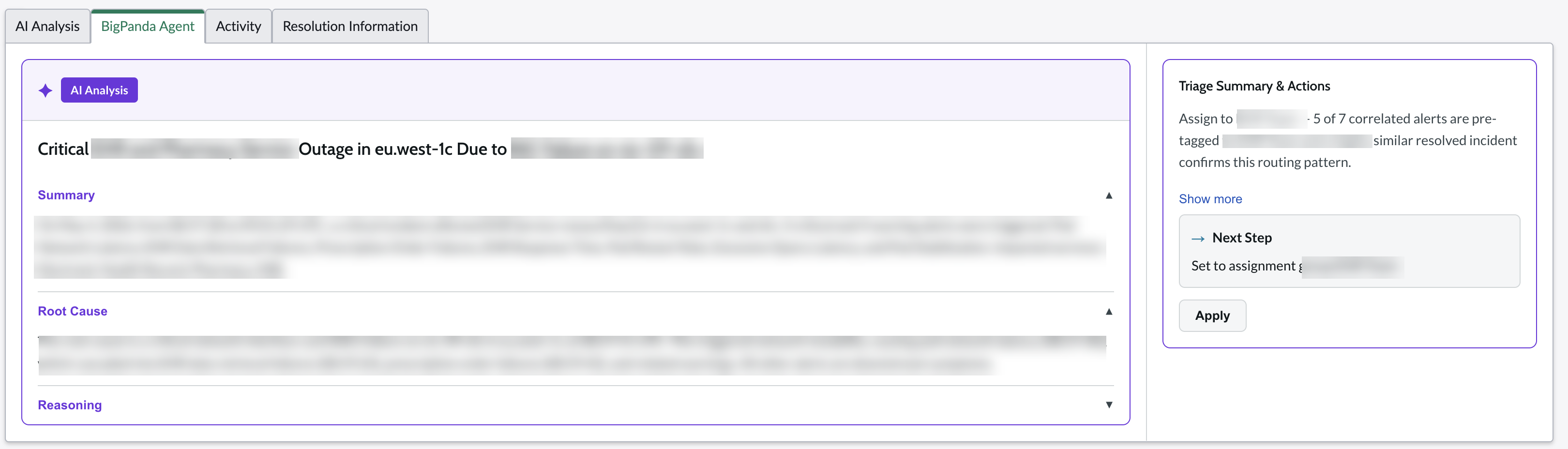
L1 Agent tab
AI Analysis: a summary of the incident, potential root cause, and supporting reasoning based on correlated alerts and historical patterns.
Triage Summary: the recommended assignment group together with the reasoning behind the recommendation.
Immediate action: Apply a recommendation such as an assignment group with the single click of a button.
Follow these steps to Add the L1 Agent to your ServiceNow integration.
To learn more about the security architecture of the L1 Agent in the BigPanda trust center.
ServiceNow integration v2.x
For maximum availability, the L1 Agent leverages the integration infrastructure that underlies the BigPanda ServiceNow 2.x integration. Support for the L1 Agent in the ServiceNow v3.x integration is in development.
Enable automated runbooks with the On-Prem Worker
BigPanda's L1 Agent On-Premises Worker is a lightweight containerized agent that runs on your infrastructure to execute runbook automation steps. It connects to BigPanda using mutual TLS (mTLS) authentication and executes pre-registered workflows on demand.
Secure by design: All communication is encrypted with per-organization certificates. The worker only makes outbound connections.
Read-only and data-in-place: The worker reads data from your systems at the source and returns structured diagnostic results to BigPanda. It does not copy, replicate, or move data between systems or environments.
No standing credentials: The worker does not store or cache credentials. At runtime it assumes a customer-defined service role to obtain temporary, scoped credentials, which exist in memory only for the duration of the runbook execution.
Customer-controlled execution: All runbooks are authored, reviewed, and owned by your team. The worker only runs pre-registered workflows. No arbitrary code execution is possible.
Configure an on-prem worker for your system with the On-Prem Worker instructions.
Review security guidance for implementing on-prem workers in the BigPanda Trust Center.
Ansible runbooks
BigPanda can also support runbook processing through the Ansible Automation Platform.
Add incident context through the Unified Data Connector
The BigPanda Unified Data Connector syncs data from your ITSM platforms to provide context and insight for the AI Incident Assistant, AI Incident Prevention, and AI Detection and Response. Ingested data is securely stored and made available in the IT Knowledge Graph, powering accurate answers, deep analytics, trend analysis, and advanced capabilities.
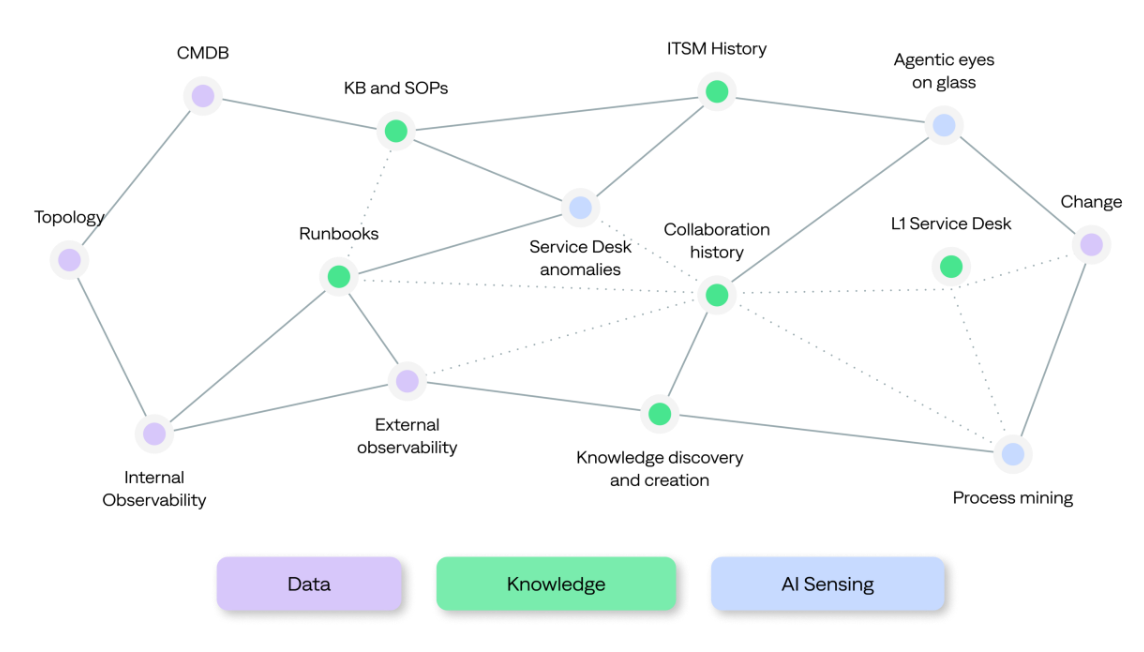
IT Knowledge Graph powered by UDC
The BigPanda Unified Data Connector syncs data from your ITSM platforms to provide context and insight for the AI Incident Assistant, AI Incident Prevention, and AI Detection and Response. Ingested data is securely stored and made available in the IT Knowledge Graph, powering accurate answers, deep analytics, trend analysis, and advanced capabilities.
The Unified Data Connector has a standard connector for many tools, or a custom connection can be created for the tool of your choice.
Runbook options
BigPanda remains tool-agnostic, ingesting your runbooks right from your chosen source of record. Whether you keep runbook data in ServiceNow, Confluence, Sharepoint, a custom wiki, or even raw PDF files, BigPanda can connect your data. If you don't see your preferred data source in the list of available configurations, reach out to your account team to discuss options.
Next Steps
View available standard connectors and best practices in the BigPanda Unified Data Connector documentation.
BigPanda's commitment to the security of your data is build into the core of the Unified Data Connector. See available PII protection offerings in Data Redaction with UDC.
Review data requirements and sync recommendations for ServiceNow tables to ensure all downstream functionality is properly connected.
Identify available sync options for runbooks and knowledge base information hosted in the Confluence through the Confluence Data Connector.