Install the ServiceNow Integration
Use BigPanda to automatically create incidents in ServiceNow, based on high-level incidents that are intelligently grouped from multiple alerts. The ServiceNow application has a convenient UI that provides configurability to support most use cases with documentation for further customization. Integrating BigPanda with ServiceNow reduces IT noise resulting in faster incident resolution.
Compare supported versions and types or read more about the bidirectional sync capabilities and best practices in the ServiceNow documentation.
Assistance required
The BigPanda - ServiceNow v3 integration includes major architectural changes, including new security roles, and deprecated API patterns. The upgrade process must be planned and coordinated with your BigPanda account team.
Contact your BigPanda account team to discuss next steps to upgrade to a 3.x integration version.
Relevant Permissions
The ServiceNow integration requires a BigPanda account with these permissions at Full Access level:
Manage Environments - Full access to environments the UI and API, and the ability to view and action all incidents.
Incident Actions (All Environments) - Full access ability to perform actions on all enrichment tags and incidents (assign, snooze, share, comment).
Integrations - View, install, and edit integrations in the Integrations tab.
AutoShare - View, add, edit, and delete AutoShare rules.
Incident Enrichment - View, create, and edit Incident Tags.
Alert Enrichment - View, create, and edit Alert Tags. Required for integrations connecting ServiceNow CMDB data to BigPanda.
Root-Cause Changes - View change details within an incident and mark changes as Suspect or Match. Required for integrations for organizations leveraging change data in BigPanda incidents.
Alert Filtering & Planned Maintenance - View, create, edit, and delete Maintenance Plans and Alert Filters. Required for integrations connecting ServiceNow maintenance windows to BigPanda.
To learn more about how BigPanda's permissions work, see the Roles Management guide.
Before you begin
Before installing or upgrading, confirm the following:
Your ServiceNow instance runs Xanadu or later.
You have an active ITSM license.
Your ServiceNow instance can make outbound HTTPS (port 443) connections to your BigPanda API region.
You have the required BigPanda credentials:
Bearer Token
API Key
Incidents App Key
Changes App Key (if you use the Changes module)
CMDB Enrichment v2 API Key (if you use CMDB v2 or incident merge)
Open Integration Manager (OIM) API Key (if your organization uses OIM)
You have identified which users need the
x_bip_panda.userandx_bip_panda.adminroles.The BigPanda integration service account in ServiceNow will have both the
x_bip_panda.useranditilroles assigned.Outbound HTTPS access to your BigPanda API region is allowed from your ServiceNow instance.
If upgrading, you have documented any custom transform map modifications that should be preserved during migration.
Requirement | v2.9.x | v3.0+ |
|---|---|---|
ServiceNow platform | All supported releases | Xanadu or later. |
ITSM license | Required | Required. |
Application scope | Unscoped (global) | Scoped ( |
ServiceNow Store certification | No | Yes. |
An active BigPanda subscription with API access is required for all versions.
Firewall rules
If your ServiceNow instance uses restricted outbound access, allow HTTPS (port 443) traffic to your region's BigPanda API endpoint. No other ports or protocols are required.
The v3 integration uses dedicated scoped roles instead of relying on global ServiceNow roles.
Role | Label | Access Level | Typical Users |
|---|---|---|---|
| BigPanda User | Read-only access to all BigPanda tables. Can view configuration (credentials masked), incident metadata, similar incidents, and related changes. | NOC analysts, on-call engineers, and anyone who needs visibility into BigPanda data. |
| BigPanda Admin | Full access to all BigPanda tables. Can create, modify, and delete configuration versions, manage credentials, and run administrative operations. | Integration administrators responsible for setup and maintenance. |
Assign ITIL and user role for admins
Assign x_bip_panda.user along with x_bip_panda.admin for users who need administrative access. The admin role does not automatically include read-only permissions.
As part of ServiceNow Store certification requirements, the itil role was removed from BigPanda application roles. The integration service account still requires ITIL-level access to create and update incidents in the ServiceNow incident table.
When creating the BigPanda service account in ServiceNow, assign both of the following roles:
x_bip_panda.user- grants access to BigPanda scoped tables and data.itil- grants the access needed to create, read, and update records in the incident table and other ITSM tables.
Without the itil role, the integration service account will not be able to create or update incidents in ServiceNow.
AuthScope
For access to ServiceNow, the BigPanda app must have the useraccount Authscope assigned.
Install the BigPanda Application from the ServiceNow Store
The v3 application is installed from the ServiceNow Store. Three fix scripts run automatically during installation to create scoped tables, register the BigPanda CMDB discovery source, and populate a default configuration record.
Open the BigPanda app listing in the ServiceNow Store.
Click Buy and complete the installation wizard.
Wait for the installation to finish. This takes 3-5 minutes and a progress bar will show the installation status. Don't close the browser or navigate away from the page while this happens.
In the ServiceNow navigation pane, confirm the BigPanda application is available. If modules are not visible, refresh your browser or log out and back in.
NOTE: The BigPanda ServiceNow v3 integration requires ServiceNow Xanadu or later, and an ITSM license. See the ServiceNow v3 integration documentation for detailed system requirements.
Connect ServiceNow to BigPanda
To set up the BigPanda application in ServiceNow, click All on the top menu to open the navigation pane, then go to BigPanda > Admin > Configuration.
Click the globe icon on the far right of the top menu to open the application scope picker. Select the BigPanda scope. You must select the BigPanda scope whenever making edits to your configuration, otherwise your edits will not be saved.
Using the details below, fill in the inputs for Bearer Token, API Key, and Incidents App Key, and take note of important URLs.
Bearer Token:
<Your Org Bearer Token>Incidents App Key:
<Your App Key>OIM API Key:
<your OIM API key>. This key is required if your BigPanda organization uses OIM for advanced alert enrichment and correlation. Contact your BigPanda account team to obtain an OIM API key if needed.Incident URL Base: https://a.bigpanda.io/v2/feed/all/
Incidents Retrieval Endpoint:
https://integrations.bigpanda.io/servicenow/incidents/retrieveIncidents Callback Endpoint:
https://integrations.bigpanda.io/servicenow/incidents/callback
Once the fields have been configured, click Submit at the bottom of the page.
Create a User for BigPanda in ServiceNow
Create a dedicated ServiceNow integration user. We recommend using a dedicated non-interactive service account for this integration, for example bigpanda. This prevents the integration from being affected by individual user account changes.
In ServiceNow, under User Administration > Users, select New
Enter a username for the integration account, for example
bigpanda.Enable the Active checkbox.
Generate a password and save it securely for use during the webhook configuration step.
Make sure the Password needs reset checkbox is not checked.
Click Submit, then reopen the user record to confirm that Password needs reset is still cleared.
Navigate to the Roles tab at the bottom of the screen and select Edit…. Do not edit through Roles module in the Navigation Sidebar
In the Collection field, search for and add the required roles to the Roles List by double-clicking each one. At minimum, add
x_bip_panda_user,itil, andrest_service. The v3 integration includes the following BigPanda roles:Role
Purpose
When to Assign
x_bip_panda_userStandard integration user role for API operations. Required for the integration user account.
Always required for the integration user (usually
bigpanda). Also required for OAuth users.x_bip_panda.adminFull administrative access to all BigPanda configuration and settings.
Assign to ServiceNow administrators who will manage the BigPanda integration configuration.
itilAdds scoped access for itil features
Always required for the integration user.
rest_serviceAdds scoped access for rest service features
Always required for the integration user.
Click Save
Assign roles to the BigPanda integration user in ServiceNow
Find the newly created user by filtering by User ID to
bigpandaNavigate to the Roles tab at the bottom of the screen and select Edit… (Do not edit through Roles module in the Navigation Sidebar)
In the Collection field, search for and add the required roles to the Roles List by double-clicking each one. At minimum, add
x_bip_panda_user,itil, andrest_service.The v3 integration includes the following BigPanda roles:
Role
Purpose
When to Assign
x_bip_panda_userStandard integration user role for API operations. Required for the integration user account.
Always required for the integration user (e.g.,
bigpanda). Also required for OAuth users.x_bip_panda.adminFull administrative access to all BigPanda configuration and settings.
Assign to ServiceNow administrators who will manage the BigPanda integration configuration.
NOTE: In addition to the BigPanda role, the integration user must also have the ServiceNow platform roles
itilandrest_service.Click Save
If administrators will manage the integration configuration directly in ServiceNow, assign x_bip_panda.admin to those admin users separately.
NOTE: For access to ServiceNow, the BigPanda app must have the useraccount Authscope.
NOTE: A unique integration user needed for every BigPanda organization. If you connect multiple BigPanda organizations to the same ServiceNow instance, you will need to create a unique integration user for every organization using the steps above. We recommend giving the user a clear name that indicates the related BigPanda organization.
Configure Integration Webhook
In the BigPanda console, configure the ServiceNow integration webhook:
x-bp-servicenowPassword: Enter the password for the user created in the previous section.
x-bp-api-key header: Enter the value for the API Key created earlier.
x-bp-config-servicenowUrl: Enter the full domain name of your ServiceNow account.
x-bp-servicenowUsername: Enter the username, usually
bigpanda.Add a new custom header called
x-bp-config-org-id. For the value, enter the organization ID for the BigPanda organization you're integrating with ServiceNow.(Optional) Add any additional custom headers if needed, such as those required for OAuth v2.0. Refer to the ServiceNow Advanced Customization documentation for more details on available custom headers.
Click Configure Webhook
Webhook Builder
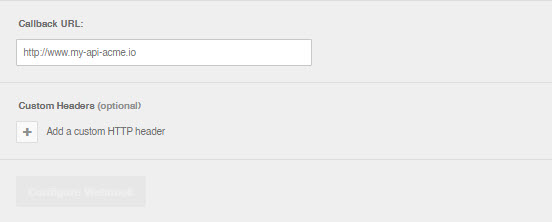
Webhook builder
Configure the App in ServiceNow
Once the basic API setup is completed, you need to configure incident synchronization.
From the top menu in ServiceNow, navigate to All > BigPanda > Admin > Configuration.
Field mappings will be set to defaults but can all be customized. See the ServiceNow Incidents documentation for more information.
Configure the Incidents Module
The incidents module configuration is managed in the ServiceNow application, under BigPanda > Admin > Configuration.
Enable the Incidents Module
In ServiceNow, go to All > BigPanda > Admin > Configuration.
Open the Incidents tab.
Enable the Active checkbox.
Click Save.
This is the master switch for incident synchronization between BigPanda and ServiceNow.
Configure Module Settings
Configure the Incidents section.
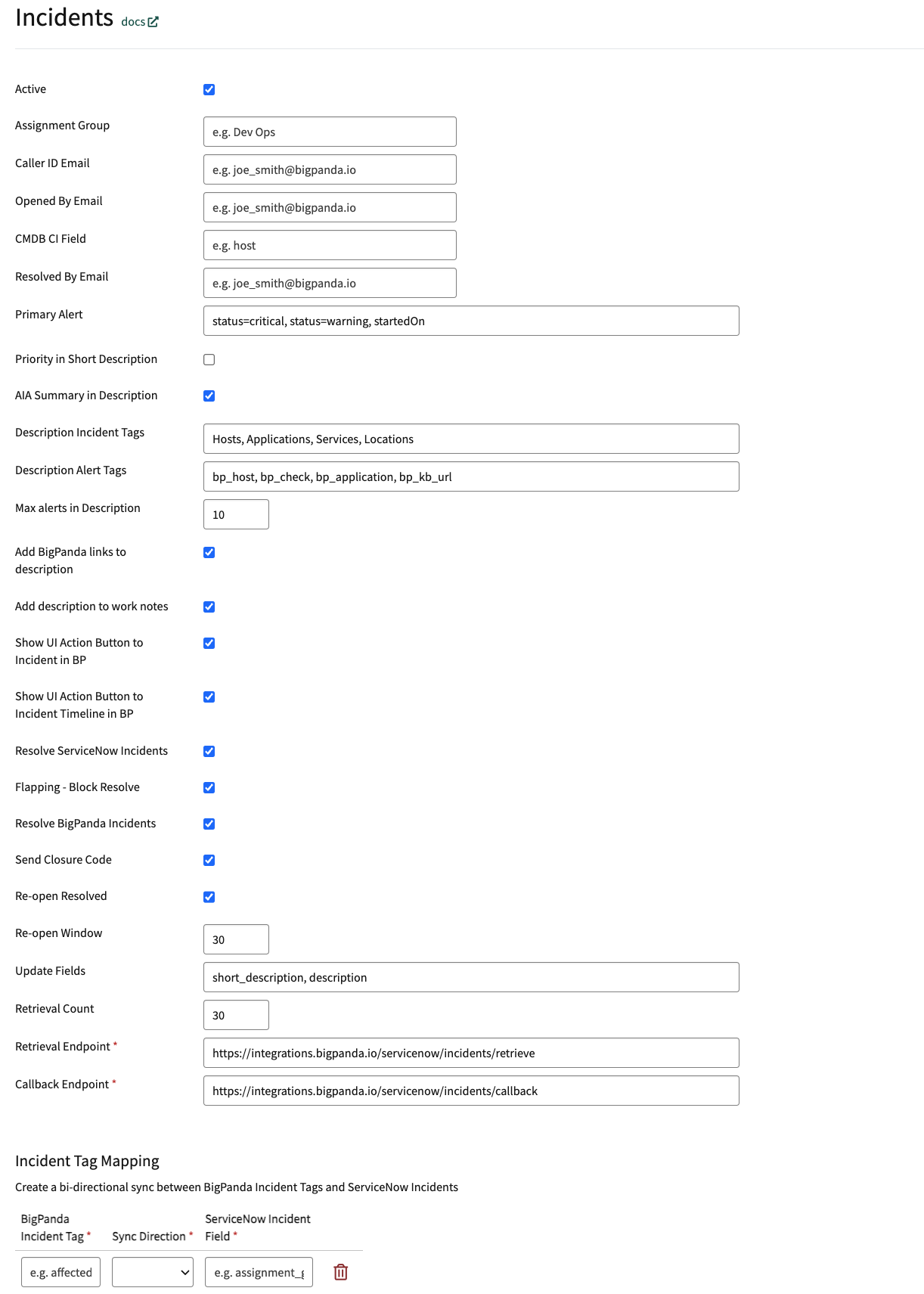
Incidents Settings
Parameter | Description |
|---|---|
Active | Enable this checkbox to activate incident synchronization. |
Assignment Group | The group to which BigPanda assigns new ServiceNow incidents. For example, |
Caller ID Email | A default email associated with the ServiceNow user calling in the incident. BigPanda searches for the caller's details and populates the Caller ID field. |
Opened By Email | A default email associated with the ServiceNow user who created the incident. BigPanda searches for the user's details and populates the Opened By field. |
CMDB CI Field | An alert tag representing the physical server of your system, such as |
Resolved By Email | The email address of the ServiceNow user that resolved the incident. |
Primary Alert | A comma-separated list of criteria for the alert you want to define as the Primary Alert. For example, |
Priority in Short Description | Include the BigPanda priority incident tag in a ServiceNow ticket's Short Description. |
AIA in Short Description | Include the AI-generated Incident Analysis Summary in a ServiceNow ticket's Description. |
Description Incident Tags | A comma-separated list of BigPanda incident tags to include in a ServiceNow ticket's Description. |
Description Alert Tags | A comma-separated list of BigPanda alert tags to include in a ServiceNow ticket's Description. |
Max alerts in Description | The total number of alerts that can be included in a single ServiceNow ticket's Description. |
Add BigPanda links to description | Include links to the BigPanda incident, preview, and timeline in a ServiceNow ticket's Description. |
Add description to work notes | Add BigPanda's standard incident Description in the Work Notes for an incident. |
Show UI Action Button to Incident in BP | Add a button in the ServiceNow incident with an anchored link to the BigPanda incident. |
Show UI Action Button to Incident Timeline in BP | Add a button in the ServiceNow incident with an anchored link to the BigPanda incident timeline. |
Resolve ServiceNow Incident | Automatically resolve the ServiceNow incident when the corresponding BigPanda incident is resolved. |
Flapping - Block Resolve | Block resolution of ServiceNow incidents when the BigPanda incident is marked as flapping. |
Resolve BigPanda Incident | Automatically resolve the BigPanda incident when the ServiceNow incident is resolved. |
Send Closure Code | Send closure information about a resolved ServiceNow incident as a comment in the BigPanda incident. |
Re-open Resolved | Enable a ServiceNow incident to be reopened when the BigPanda incident is reopened. Disable if you want to create a new ServiceNow incident instead. |
Re-open Window | The timeframe during which the ServiceNow incident can be reopened. Default is 30 minutes. |
Update Fields | The list of ServiceNow fields that should be updated when a BigPanda incident is updated. |
Retrieval Count | The number of BigPanda incidents retrieved per polling cycle. Default is 30. |
Retrieval Endpoint | The URL where ServiceNow retrieves BigPanda incidents. |
Callback Endpoint | The URL where ServiceNow sends updates back to BigPanda. |
Incident Tag Mapping | A table of BigPanda incident tags and ServiceNow incident fields to sync. Sync direction can be BP to SNOW, vice versa, or bidirectional. Only Text type incident tags are supported. |
When satisfied with your configuration, click Save.
For a complete list of available fields, see ServiceNow Advanced Customization.
If you have not been granted Administrator access to the ServiceNow integration system, you can modify the integration through custom headers. To learn more, see Custom Headers.
Tag Synchronization
The v3 app provides per-tag direction control for tag synchronization. For each mapped tag, select one of:
Bidirectional - Keep the BigPanda tag and the ServiceNow field in sync in both directions.
To BigPanda only - Changes flow from ServiceNow to BigPanda.
To ServiceNow only - Changes flow from BigPanda to ServiceNow.
Outbound sync uses a five-second coalesce window to batch rapid field changes into a single API call. Value-comparison guards prevent echo-back loops between systems, and reference fields (for example, group names) are automatically resolved to the correspondingsys_id.
Configure the Alert Configuration Module
The Alert Configuration module controls how BigPanda alerts are processed, stored, and attached to ServiceNow records.
In the ServiceNow application, navigate to BigPanda > Admin > Configuration.
In the Alert Processing - Addon section, select Alert Configuration.
Adjust the configuration to fit the needs of downstream teams.
Field | Description |
|---|---|
Turn on alert processing and associate alerts to an incident? | Enables alert processing features. Select Yes to enable all other alert table functionality. |
Turn on logging for alert processing to help debugging? | Turns on troubleshooting logs for alert processing. Enable only during testing or troubleshooting. |
What alert tag contains the hostname field that should map to the CMDB_CI table for alert bindings? | The name of the BigPanda alert tag that contains host data. |
Use the alert Primary Property for the HOST field to look up CMDB CI alert bindings? | Use the primary property tag as the hostname field. |
If hosts are not found in the CMDB, should they be automatically added to the CMDB_CI table and listed as Pending Install? | Adds unmatched hosts to the CMDB_CI table. |
What should be the numerical status of new CMDB_CI items (4= Pending Install)? | The status to assign to newly created CMDB_CI records. |
Use the BigPanda View link from the BigPanda activity log in the BigPanda console? | Directs activity log links to the BigPanda view instead of the ServiceNow incident view. |
The alert tag that contains the assignment group for mapping alerts or incident tasks to an assignment group. | Automatically assigns alerts to matching ServiceNow assignment groups. |
Map a custom tag to the priority field on the alert record? | Enables priority mapping from a custom BigPanda alert tag. |
The alert tag name that will be included to create an incident task. | If the value of this tag is |
What alert tag from BigPanda should represent severity? | The BigPanda alert tag used for severity. Values must be |
Have you installed the add-on for BigPanda alert tables (BP alerts)? | Enables creation of BigPanda alerts in the |
Enable the similar incidents tab for the BigPanda incidents view? | Generates the Similar Incidents tab on the BigPanda view. |
Enable the RCC tab on the BigPanda incidents view? | Generates the Root Cause Changes tab on the BigPanda view. |
Parse events into the incident tasks table? (BETA) | Generates the Incident Tasks table in the BigPanda view. |
Enable AIA descriptions and remove the alert summary? | Generates the AIA tab in the BigPanda view and replaces the description field. |
Testing the integration
Manually share an existing BigPanda Incident to this newly created integration. If it is enabled, ServiceNow Telemetry and Debug tools are available.
When satisfied with the integration, turn off both Telemetry and Debug in ServiceNow in the BigPanda application configuration page.
NOTE: Telemetry and debug logging write to ServiceNow system logs on every transaction, which can produce hundreds of thousands of syslog rows per day on busy instances and degrade overall ServiceNow performance. This logging is the most common cause of BigPanda-related impacts to a ServiceNow instance.