
Configure the Integration in ServiceNow

Application Architecture
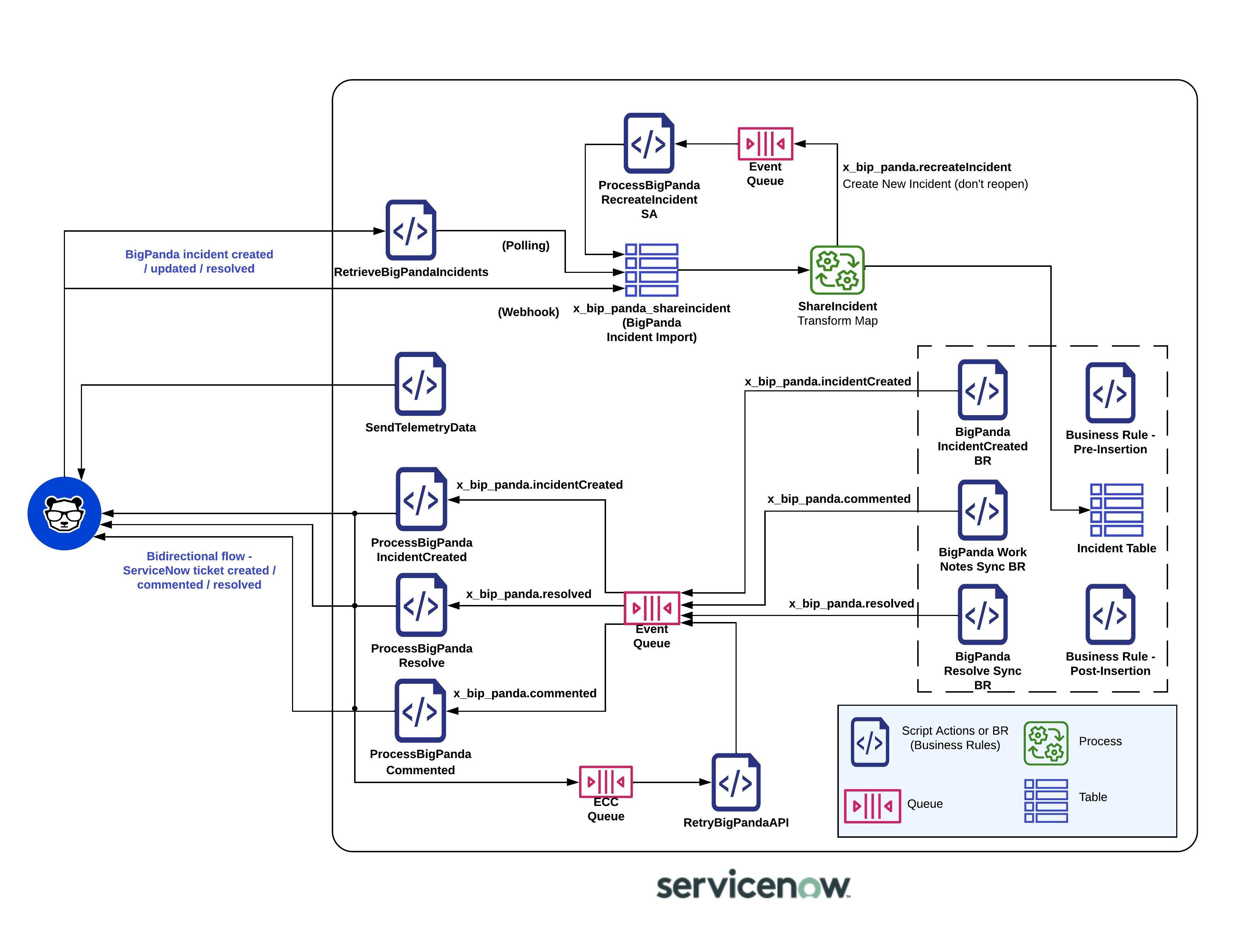
Integrations_ServiceNow_Architecture.jpeg

BigPanda ServiceNow Application Architecture

Disable Polling Script

  1. In ServiceNow from the left sidebar navigate to BigPanda > Changes > Retrieve Incidents Scheduled Job.

  2. Uncheck the Active box.

  3. Click Update to save your settings.

Open the BigPanda Configuration Page

In ServiceNow, navigate to All > BigPanda > Admin > Configuration.

Set application scope to BigPanda

In the application scope picker, select the BigPanda application scope.

Scope must be set

If the BigPanda scope is not selected, your configuration changes may not be saved. Confirm the scope before making any changes.

Define connection settings

In the BigPanda configuration page, enter the following values:

Setting

Description

Bearer Token

Your BigPanda API bearer token.

API Key

Your BigPanda organization API key.

Incidents App Key

The app key for incident routing.

Changes App Key

The app key for change management routing.

CMDB Enrichment V2 API Key

The app key for CMDB delta sync and incident merge (optional).

OIM API Key

Your OIM API key (only if your organization uses OIM).

Incident URL base

The base URL for your BigPanda console, for example https://a.bigpanda.io.

Integration User Name

The ServiceNow username you created in Step 2.

Confirm that the regional API endpoints are correct for your environment, then click Save.

During onboarding or upgrade, your BigPanda account team provides these credentials. When upgrading, existing credentials are automatically migrated and re-encrypted.

Configure the Incidents Module

The incidents module configuration is managed in the ServiceNow application, under BigPanda > Admin > Configuration.

Enable the Incidents Module

  1. In ServiceNow, go to All > BigPanda > Admin > Configuration.

  2. Open the Incidents tab.

  3. Enable the Active checkbox.

  4. Click Save.

This is the master switch for incident synchronization between BigPanda and ServiceNow.

Configure Module Settings

Configure the Incidents section.

Integrations_ServiceNow_IncidentsSettings.png

Incidents Settings

Parameter

Description

Active

Enable this checkbox to activate incident synchronization.

Assignment Group

The group to which BigPanda assigns new ServiceNow incidents. For example,DevOps.

Caller ID Email

A default email associated with the ServiceNow user calling in the incident. BigPanda searches for the caller's details and populates the Caller ID field.

Opened By Email

A default email associated with the ServiceNow user who created the incident. BigPanda searches for the user's details and populates the Opened By field.

CMDB CI Field

An alert tag representing the physical server of your system, such ashost,hostID, orhostname. BigPanda searches for this tag in the payload and sets the ServiceNow configuration item accordingly.

Resolved By Email

The email address of the ServiceNow user that resolved the incident.

Primary Alert

A comma-separated list of criteria for the alert you want to define as the Primary Alert. For example,status=critical, startedOnclassifies the Primary Alert as the oldest alert having a critical status.

Priority in Short Description

Include the BigPanda priority incident tag in a ServiceNow ticket's Short Description.

AIA in Short Description

Include the AI-generated Incident Analysis Summary in a ServiceNow ticket's Description.

Description Incident Tags

A comma-separated list of BigPanda incident tags to include in a ServiceNow ticket's Description.

Description Alert Tags

A comma-separated list of BigPanda alert tags to include in a ServiceNow ticket's Description.

Max alerts in Description

The total number of alerts that can be included in a single ServiceNow ticket's Description.

Add BigPanda links to description

Include links to the BigPanda incident, preview, and timeline in a ServiceNow ticket's Description.

Add description to work notes

Add BigPanda's standard incident Description in the Work Notes for an incident.

Show UI Action Button to Incident in BP

Add a button in the ServiceNow incident with an anchored link to the BigPanda incident.

Show UI Action Button to Incident Timeline in BP

Add a button in the ServiceNow incident with an anchored link to the BigPanda incident timeline.

Resolve ServiceNow Incident

Automatically resolve the ServiceNow incident when the corresponding BigPanda incident is resolved.

Flapping - Block Resolve

Block resolution of ServiceNow incidents when the BigPanda incident is marked as flapping.

Resolve BigPanda Incident

Automatically resolve the BigPanda incident when the ServiceNow incident is resolved.

Send Closure Code

Send closure information about a resolved ServiceNow incident as a comment in the BigPanda incident.

Re-open Resolved

Enable a ServiceNow incident to be reopened when the BigPanda incident is reopened. Disable if you want to create a new ServiceNow incident instead.

Re-open Window

The timeframe during which the ServiceNow incident can be reopened. Default is 30 minutes.

Update Fields

The list of ServiceNow fields that should be updated when a BigPanda incident is updated.

Retrieval Count

The number of BigPanda incidents retrieved per polling cycle. Default is 30.

Retrieval Endpoint

The URL where ServiceNow retrieves BigPanda incidents.

Callback Endpoint

The URL where ServiceNow sends updates back to BigPanda.

Incident Tag Mapping

A table of BigPanda incident tags and ServiceNow incident fields to sync. Sync direction can be BP to SNOW, vice versa, or bidirectional. Only Text type incident tags are supported.

When satisfied with your configuration, click Save.

For a complete list of available fields, see ServiceNow Advanced Customization.

If you have not been granted Administrator access to the ServiceNow integration system, you can modify the integration through custom headers. To learn more, see Custom Headers.

Tag Synchronization

The v3 app provides per-tag direction control for tag synchronization. For each mapped tag, select one of:

  • Bidirectional - Keep the BigPanda tag and the ServiceNow field in sync in both directions.

  • To BigPanda only - Changes flow from ServiceNow to BigPanda.

  • To ServiceNow only - Changes flow from BigPanda to ServiceNow.

Outbound sync uses a five-second coalesce window to batch rapid field changes into a single API call. Value-comparison guards prevent echo-back loops between systems, and reference fields (for example, group names) are automatically resolved to the correspondingsys_id.

Configure the Alert Configuration Module

The Alert Configuration module controls how BigPanda alerts are processed, stored, and attached to ServiceNow records.

  1. In the ServiceNow application, navigate to BigPanda > Admin > Configuration.

  2. In the Alert Processing - Addon section, select Alert Configuration.

  3. Adjust the configuration to fit the needs of downstream teams.

Field

Description

Turn on alert processing and associate alerts to an incident?

Enables alert processing features. Select Yes to enable all other alert table functionality.

Turn on logging for alert processing to help debugging?

Turns on troubleshooting logs for alert processing. Enable only during testing or troubleshooting.

What alert tag contains the hostname field that should map to the CMDB_CI table for alert bindings?

The name of the BigPanda alert tag that contains host data.

Use the alert Primary Property for the HOST field to look up CMDB CI alert bindings?

Use the primary property tag as the hostname field.

If hosts are not found in the CMDB, should they be automatically added to the CMDB_CI table and listed as Pending Install?

Adds unmatched hosts to the CMDB_CI table.

What should be the numerical status of new CMDB_CI items (4= Pending Install)?

The status to assign to newly created CMDB_CI records.

Use the BigPanda View link from the BigPanda activity log in the BigPanda console?

Directs activity log links to the BigPanda view instead of the ServiceNow incident view.

The alert tag that contains the assignment group for mapping alerts or incident tasks to an assignment group.

Automatically assigns alerts to matching ServiceNow assignment groups.

Map a custom tag to the priority field on the alert record?

Enables priority mapping from a custom BigPanda alert tag.

The alert tag name that will be included to create an incident task.

If the value of this tag is true, an incident task is created for the alert.

What alert tag from BigPanda should represent severity?

The BigPanda alert tag used for severity. Values must be critical, major, minor, warning, or unknown.

Have you installed the add-on for BigPanda alert tables (BP alerts)?

Enables creation of BigPanda alerts in the x_bip_panda_bp_alerts table.

Enable the similar incidents tab for the BigPanda incidents view?

Generates the Similar Incidents tab on the BigPanda view.

Enable the RCC tab on the BigPanda incidents view?

Generates the Root Cause Changes tab on the BigPanda view.

Parse events into the incident tasks table? (BETA)

Generates the Incident Tasks table in the BigPanda view.

Enable AIA descriptions and remove the alert summary?

Generates the AIA tab in the BigPanda view and replaces the description field.