Capabilities (IA)
The What Biggy Can Do page brings everything Biggy can invoke for your organization into one place: integrations, actions, utility actions, skills, and custom agents.
Each capability shows whether it reads or writes, whether it requires a role permission, and whether it is turned on, so you can see and govern exactly what Biggy is allowed to do on your team's behalf. From this page, you enable the capabilities your team needs, open the configuration for any of them, and create new skills and workflows.
The page is available in the web app at Manage > AI Capabilities > What Biggy Can Do.
Key features
A single capability inventory: See every agent, action, utility action, skill, and custom agent available to your organization on one page, with a count for each group and a running total at the bottom.
Clear read and write boundaries: Every capability is labeled Read or Write so you always know whether it gathers context or changes a system.
Governance built in: Write capabilities are approval-gated and carry a role permission, so a capability only runs when the person requesting it has the right role.
Per-capability control: Turn any capability on or off, or open its configuration, directly from the row.
Extensible by your team: Add your own behavior by creating a skill or a workflow, without waiting on an engineering release.
How Biggy works
Biggy is an orchestrator. For each request, it reads what you are asking, plans an approach, and composes a different combination of skills, agents, and actions to get it done. The How Biggy works panel at the top of the page walks through this with real IT-ops moments.
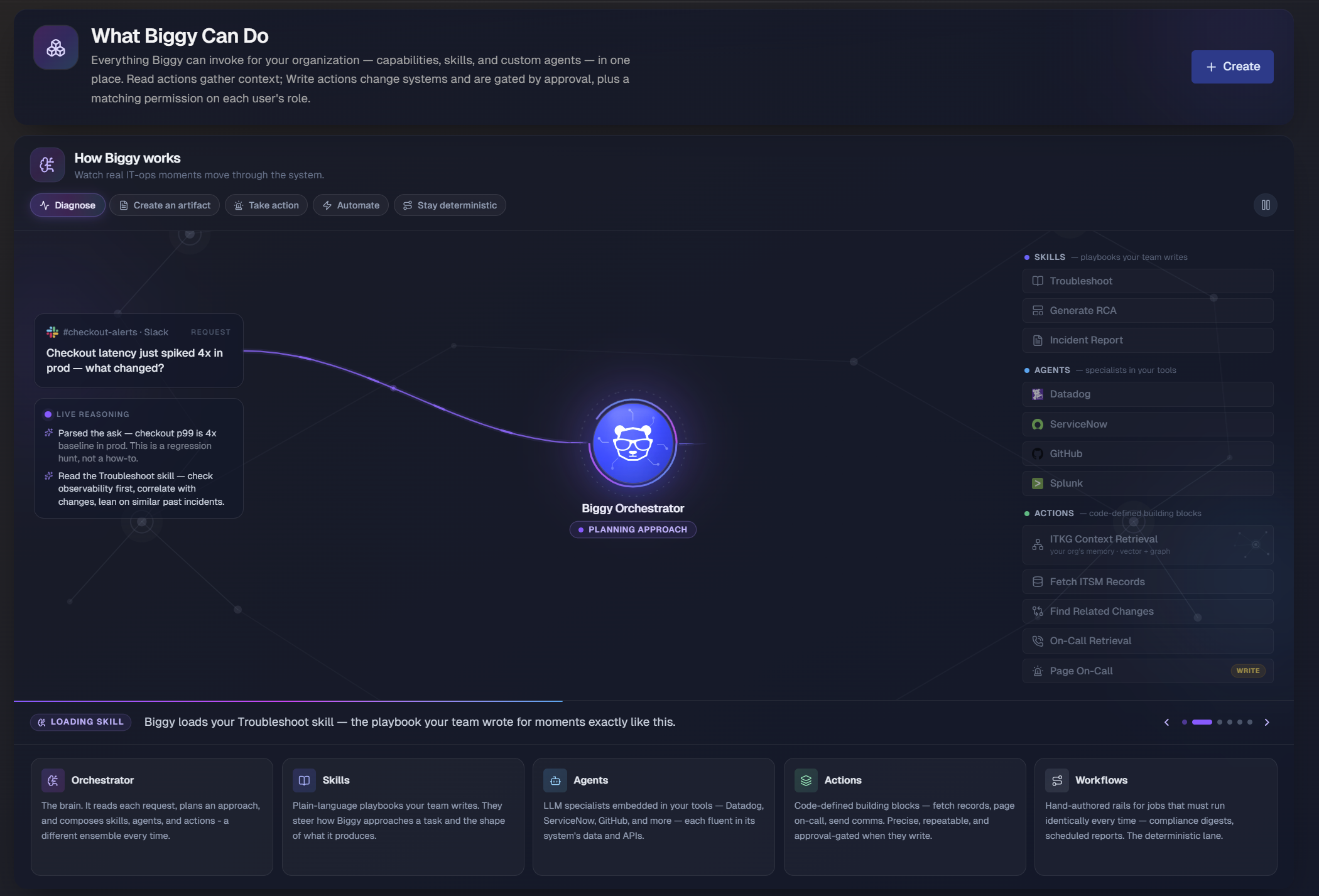
It groups Biggy's building blocks into five concepts:
Orchestrator: The brain. It reads each request, plans an approach, and composes skills, agents, and actions — a different ensemble every time.
Skills: Plain-language playbooks your team writes. They steer how Biggy approaches a task and the shape of what it produces.
Agents: Large language model (LLM) specialists embedded in your tools, such as Datadog, ServiceNow, and GitHub, each fluent in its system's data and APIs.
Actions: Code-defined building blocks that fetch records, page on-call, and send communications. They are precise, repeatable, and approval-gated when they write.
Workflows: Hand-authored rails for jobs that must run identically every time, such as compliance digests and scheduled reports. This is the deterministic lane.
Click any block to open that page in the web app.
The panel steps through five modes that show how the same orchestrator adapts to different asks: Diagnose, Create an artifact, Take action, Automate, and Stay deterministic. Use the controls in the panel to move between modes, and use the pause control to stop the walkthrough.
Capability types
The page organizes capabilities into five groups. Each group header shows the number of capabilities it contains.
Agents: Specialized agents that investigate and pull live data from your connected tools and knowledge sources. Agents cover observability, ITSM, source control, and knowledge tools, including Datadog, ServiceNow, GitHub, Splunk, the IT Knowledge Graph (ITKG), and Web Search.
Actions: Concrete operations Biggy runs on your behalf, such as paging on-call, filing tickets, and summarizing channels. Actions include both Read operations, such as Fetch ITSM Records and On-Call Retrieval, and Write operations, such as Page On-Call, Send Comms, and Update ITSM Record.
Utility Actions: Lower-level actions Biggy uses across its work, such as recalling memory, running code, and expanding acronyms. Most utility actions are always on. Examples include Adaptive Memory, Code Interpreter, Read Attached File, and Skill Loader.
Skills: Human-authored playbooks and artifact templates that teach Biggy how to handle a task or format a deliverable. Examples include Alert Noise Review, Change Review (Go/No-Go), Five Whys Analysis, and Resolution Recommender.
Custom Agents: Reusable AI specialists with their own instructions, private context, and approved capabilities. Your organization builds these to handle recurring, team-specific work.
Find a capability
To locate a capability quickly, use the Filter this page search box near the top of the list. Enter a capability name or a keyword, and the page narrows to matching rows across all groups.
Read and Write capabilities
Every capability on the page carries a marker that tells you how it behaves:
Read: Gathers context, such as querying metrics, retrieving records, or searching logs. Read capabilities do not change any system.
Write: Changes a system, such as paging on-call, updating an incident, or opening a bridge. Write capabilities are approval-gated and require a matching role permission.
Some capabilities carry additional markers:
<number>roles: The capability requires one of a set of roles to run. The badge shows how many roles are permitted.Output template: The skill produces a deliverable using a predefined output template, such as an executive summary or a status update.
Tip Start with Read capabilities to build up context and confidence, then enable Write capabilities as your team defines who should be allowed to run them.
Enable or configure a capability
Each capability row includes a toggle that turns the capability on or off, and many rows include a Configure link that opens the capability's settings.
On the What Biggy Can Do page, find the capability you want to change. Use the Filter this page search box if needed.
To turn the capability on or off, click its toggle.
To adjust the capability's settings, click Configure on its row.
To manage a whole group, use the group-level link, such as Configure actions, Configure utility actions, Manage skills, or Manage custom agents.
Teach Biggy something new
To extend what Biggy can do, click Create in the top-right corner of the page. On the New page, you choose the shape that fits what you are building:
Skill: Guidance, instructions, and reusable know-how that shape how Biggy responds, with no tool calls or data retrieval involved. Skills are a good fit for tone and formatting rules, runbook knowledge, organization-specific terminology, and response templates.
Workflow: A multi-step automation that can call tools, retrieve data, and chain capabilities together. Workflows are a good fit for jobs such as pulling ITSM records and summarizing them, querying monitoring tools, and running retrieval-backed investigations.
Select the option that matches your goal, then follow the prompts to author the new capability.