Prompt Building Best Practices
Much like communicating with a colleague, effectively interacting with Biggy benefits from general best practices. The more relevant information you provide, the better its responses will be.
Use natural language prompts, also known as queries, to handle an incident from start to finish. Biggy can find answers to questions, create incident records and response channels, generate summaries and artifacts, and retrieve on-call schedules.
When writing a prompt, consider what systems and data Biggy has access to within your organization. Biggy will not be able to provide helpful responses related to areas and topics it cannot access.
Reusable instructions
If certain instructions should be followed for all responses, configure a prompt addendum or prompt template within action plans. The guidance on this page applies equally to communicating directly with Biggy and to building prompt addendums and templates within the web app.
You can find sample queries for each action plan in the web app and on the Action Plans documentation page.
Prompt Components
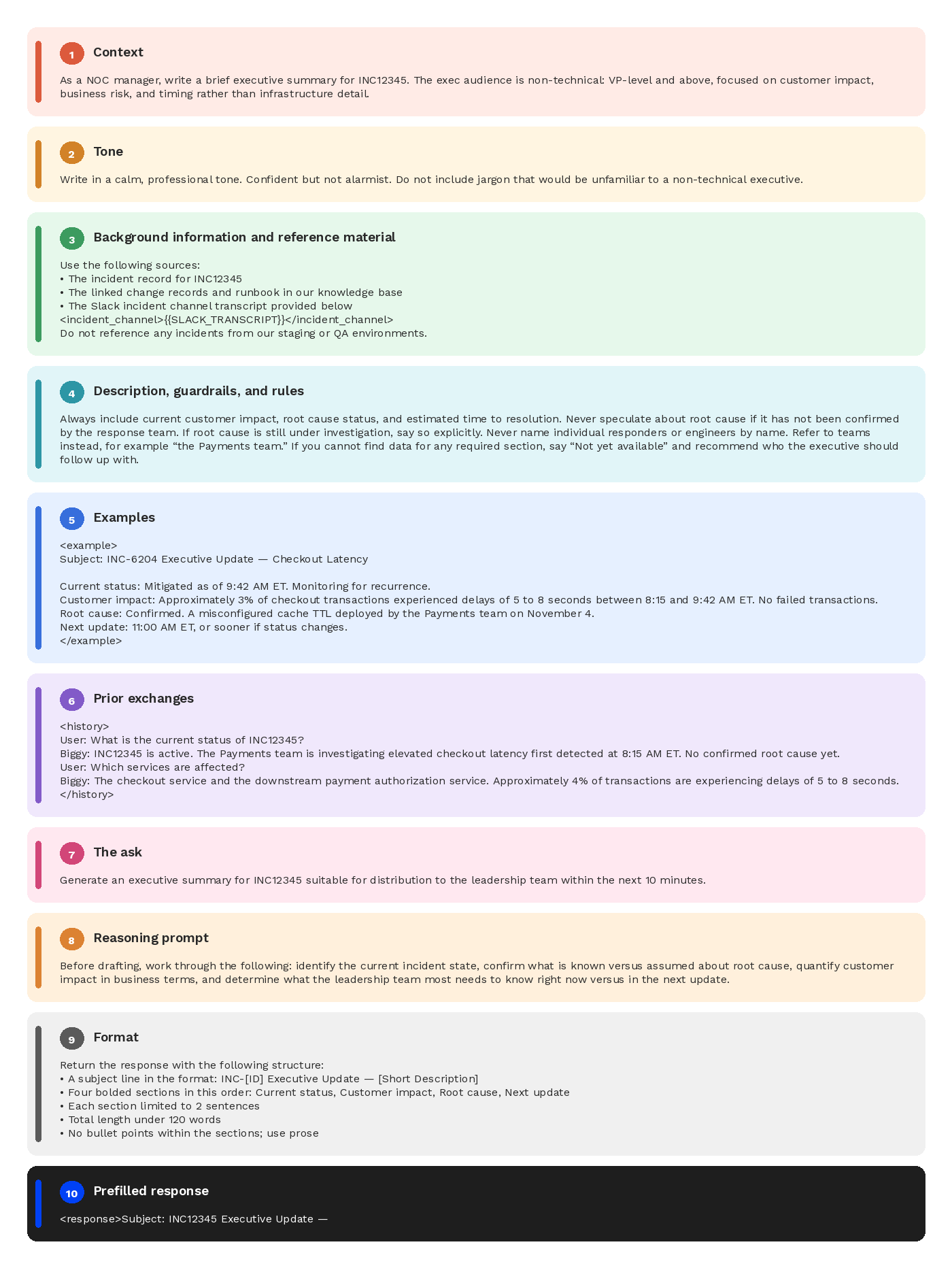
Well-structured prompts allow Biggy to produce more reliable, high-quality responses. While there is no single correct template, the ten components below represent a battle-tested pattern that scales from simple instructions to complex, production-grade prompts.
Think of these as ingredients rather than rigid steps. Not every prompt needs every component. A quick classification task might only need context, rules, and format. A prompt template or prompt addendum may use all ten.
When a prompt does need all components, they should appear in the order listed below. Start with the components most relevant to your use case and add others as needed. Working from a broad context down to the specific request helps Biggy build understanding progressively before it is asked to act.
The ten prompt components are:
Context: Who Biggy is acting as and what the high-level job is.
Tone: The voice and register Biggy should adopt.
Background information and reference material: Source content Biggy needs to ground its answers.
Description, guardrails, and rules: How Biggy should behave, including what it must and must not do.
Examples: Sample interactions of the desired behavior.
Prior exchanges: Conversation history, if any.
The ask: The specific request Biggy needs to act on right now.
Reasoning prompt: An instruction to work through the problem before answering.
Format: The exact structure of the output.
Prefill response: Optionally, begin Biggy’s response.
The order of your prompt matters. Include context and reference material first, rules and examples in the middle, and the specific request and formatting instructions last. This progression mirrors how a thoughtful person would brief a new colleague before handing them a task.
1. Context
Open by establishing what your persona is and what Biggy is being asked to do at a high level. Assigning a clear identity, for example "a NOC manager looking for information on an incident," gives Biggy a frame of reference for vocabulary and scope. This is also where you set expectations about who the audience is and what success looks like.
Be specific and detailed about the outcome you want, and avoid ambiguous statements. Instead of asking Biggy to write about the incident, ask it to summarize INC1234 and focus on the impact it had on the east region. Action words such as write, create, analyze, summarize, and compile help generate useful content.
State who the response is for. A summary written for an on-call engineer looks different from one written for an executive, and Biggy produces a much sharper response when it knows the audience up front.
If anything should not be included in the response, specify what should be left out. This can include information that should not be referenced, such as incidents related to test instances, non-production code, or anything that identifies individual customers.
Example
Create a list of closed tickets that were assigned to John Smith from the past 2 months. For each ticket, provide a short summary directed toward an executive audience of what the issue was and how it was resolved. I am looking for trends in the tickets that John Smith has handled.
2. Tone
Specify the tone Biggy should adopt. For example, the response could be warm and casual, formal and precise, empathetic, or technical. Tone is easy to overlook, but it has an outsized effect on whether responses feel right for your use case. Be explicit. "Professional" means different things to different people.
If the same tone will be reused across many incidents, capture it in a Prompt Template rather than repeating it in every query. Templates keep the voice consistent and let user-side prompts focus on what is unique about each incident.
Example:
Write the response in a warm and friendly tone.
3. Background information and reference material
Biggy performs best when it understands the reasoning behind your question. Provide as much relevant information as possible, including the issue's history, why you are asking, the effects the problem is having on your environment, and any teams or systems involved.
Supply the source content Biggy needs to form a response. This might include knowledge base articles, product documentation, customer records, transcripts, or images. Wrap reference material in clearly labeled tags, such as <knowledge_base> or <policy>, so Biggy can distinguish between inputs and instructions. Placing heavy context near the top of the prompt, before the specific task, generally improves performance.
If the query relates to a conversation that Biggy does not have access to, include that conversation in the prompt so it has all the context it needs. Attaching documents or including links can also provide additional context.
Name your inputs and sources explicitly. Specify the incident ID, channel context, change record, and which systems should be consulted, for example ITSM, observability tooling, runbooks, or knowledge bases. Naming the inputs keeps the response grounded in real data instead of plausible-sounding guesses.
If certain sources should be excluded, for example test instances, non-production environments, or stale documentation, say so explicitly. Defining the time window or system scope of the query has the same effect: it narrows the focus to the data that actually matters.
Example
Investigating incident INC-4892, recurring latency spikes on our checkout service, three times this week between 2 and 3 AM ET. Started shortly after the Payments team deployed a new caching layer two weeks ago. Currently impacting roughly 4% of transactions during spike windows. Using the incident record for INC-4892, the linked change records, and the runbook in our knowledge base, identify any correlated alerts or topology changes in the 30 minutes before each spike to help determine if this is infrastructure or application-related. Do not reference any incidents from our staging environment.
4. Description, guardrails, and rules
Spell out exactly how Biggy should act, including what it should always do, what it must never do, edge cases to watch for, and fallback behaviors when it does not know an answer. Concrete rules work better than vague instructions. For example, "if a user asks about pricing for a discontinued product, direct them to support" is more useful than "be helpful."
Even with good context, some queries may encounter gaps in access or available data. For example, there may be a system Biggy cannot reach, a record that has not yet been created, or a runbook that is out of date. Tell Biggy how to handle those gaps. The safest default is to instruct it to explicitly call out unknowns and suggest a next step rather than fill the gap with a guess.
This is especially important during active incidents, where a confidently wrong answer can send a responder down the wrong path. A short fallback instruction in the prompt is usually enough to prevent it.
Example
If you cannot find a linked change record for INC4521, say so clearly and recommend who to contact next. Do not infer a likely cause from the incident description alone.
5. Examples
Provide examples of what a response should look like. A few well-chosen examples of ideal interactions, wrapped in tags such as <example>, anchor Biggy's behavior better than additional instructions. Examples are especially valuable when you are enforcing a specific format, persona, or refusal pattern.
Example
The response should be in the following format:
The US team has resolved the following incidents in the past week:
INC1234INC4789INC9256INC3493
6. Prior exchanges
If applicable, include prior messages to maintain continuity. A simple structure with <history> tags works well. If there are no prior exchanges yet, make that explicit rather than leaving the section blank. For example: This is the start of the conversation.
Example
<history>
User: What is the current status of INC12345? Biggy: INC12345 is active. The Payments team is investigating elevated checkout latency first detected at 8:15 AM ET. No confirmed root cause yet. User: Which services are affected? Biggy: The checkout service and the downstream payment authorization service. Approximately 4% of transactions are experiencing delays of 5 to 8 seconds.
</history>
7. The ask
State the specific thing you want Biggy to do right now. Even when the broader job is described at the top of the prompt, restating the immediate ask near the end keeps it top of mind. The ask is often pulled from user input and inserted as a variable, such as {{QUESTION}}.
Keep each ask scoped to a single purpose. The most effective prompts do one thing well. A prompt that tries to triage, summarize, generate an executive update, and recommend a postmortem owner simultaneously may not yield optimal results. The rule of thumb is to keep it to one main task per action plan or workflow step.
If a workflow genuinely needs steps in a fixed order, for example, gather data, then summarize, then draft a comms update, split it into separate prompts rather than specifying the order inside a single long prompt. Each step stays simpler, easier to debug, and easier to reuse.
Example
Compile information about INC12345 and INC32456 into a report suitable for executive audiences.
8. Reasoning prompt
For tasks that benefit from deliberation, such as analysis, multi-step problems, or judgment calls, explicitly invite Biggy to work through the problem before answering. Phrases like "work through this step by step before responding" or "first, identify the key considerations" can improve accuracy on complex tasks.
Asking Biggy to explain its reasoning step by step also provides insight into how it reached its conclusion. This is especially helpful when the response will be used to make a decision.
For simple lookups or short responses, this section can be skipped.
Example
Identify which change was most likely to have caused this outage, and why. List the steps that you took to reach this conclusion, with details about resources referenced for each step.
9. Format
Tell Biggy exactly how to structure the output. Specify whether the response should be in bullet points or paragraphs, the length, the sections, and the audience. Format and audience have an outsized effect on whether the response is usable.
Being precise here saves you time downstream and makes outputs easier to parse.
Example
Generate a 60-second MIM update for executives. Use three short sections: current status, customer impact, and next update time. Keep it under 120 words, and use bullet points where possible.
10. Prefill response
You can begin Biggy's turn with a partial response that the model will continue from. Starting with an opening tag such as <response> forces Biggy to skip preambles and jump straight into the desired format.
Example
<response>Subject: INC12345 Executive Update —
Things to avoid
A few patterns reliably degrade response quality. Watch for these when you are writing or reviewing a prompt.
Conflicting instructions: Asking for a brief response and a comprehensive one in the same prompt forces Biggy to pick, often badly.
Inconsistent syntax or wording: Using different terms for the same thing within one prompt makes it harder for Biggy to track what you mean.
Overloaded or complex instructions: Long prompts with many simultaneous requirements tend to produce shallow responses to each.
Brittle or "never" instructions: Broad prohibitions are hard to apply consistently. Describe the desired behavior instead.
Hard-coded order of operations: If a fixed sequence is genuinely required, split the work into separate action plans.
One prompt for every workflow: A prompt that tries to handle every variation usually handles none of them well.
Hard-coded credentials, hostnames, or secrets: Never embed these in prompts. Prompts are not the right place to store sensitive values.
Ask follow-up questions
If a response is not clear, ask for more details or explanations. To continue a conversation, use the Reply functionality in Teams or Threads in Slack. Biggy will continue to reference the context of the messages being replied to, enabling a more natural and intuitive conversation.
Prompt Checklist
When you are writing or reviewing a prompt, whether it is a system-side template or a one-off user query, sanity-check it against the following:
Goal: Is it clear what we want to produce, and for whom?
Inputs and scope: Does Biggy know what data to use and not use, and over what time or system range?
Format and audience: Are the structure, tone, and length specified where it matters?
Safety and guardrails: Are there any secrets, or any language that might cause hallucinated tickets, incidents, or actions?
Fallback behavior: Has Biggy been told what to do when data is missing?
Simplicity: Could this be made shorter, or split into a sequence, without losing clarity?